

Phish of the Week
November 23, 2026
Phish of the Week 23rd of November

# Phish of the Week
# Phishing
Draft Tax Return Review

Mette Luntama
Phish of the Week: Device Code Phishing via Draft Tax Return Review
This device code phishing campaign impersonates an internal Tax Services team, sending a fake OneDrive share of a draft tax return from a compromised external mailbox. The linked document appears locked behind a one-time passcode that is really a device code, and entering it on Microsoft’s genuine sign-in page gives the attacker access to the recipient’s account.
How the attack works:
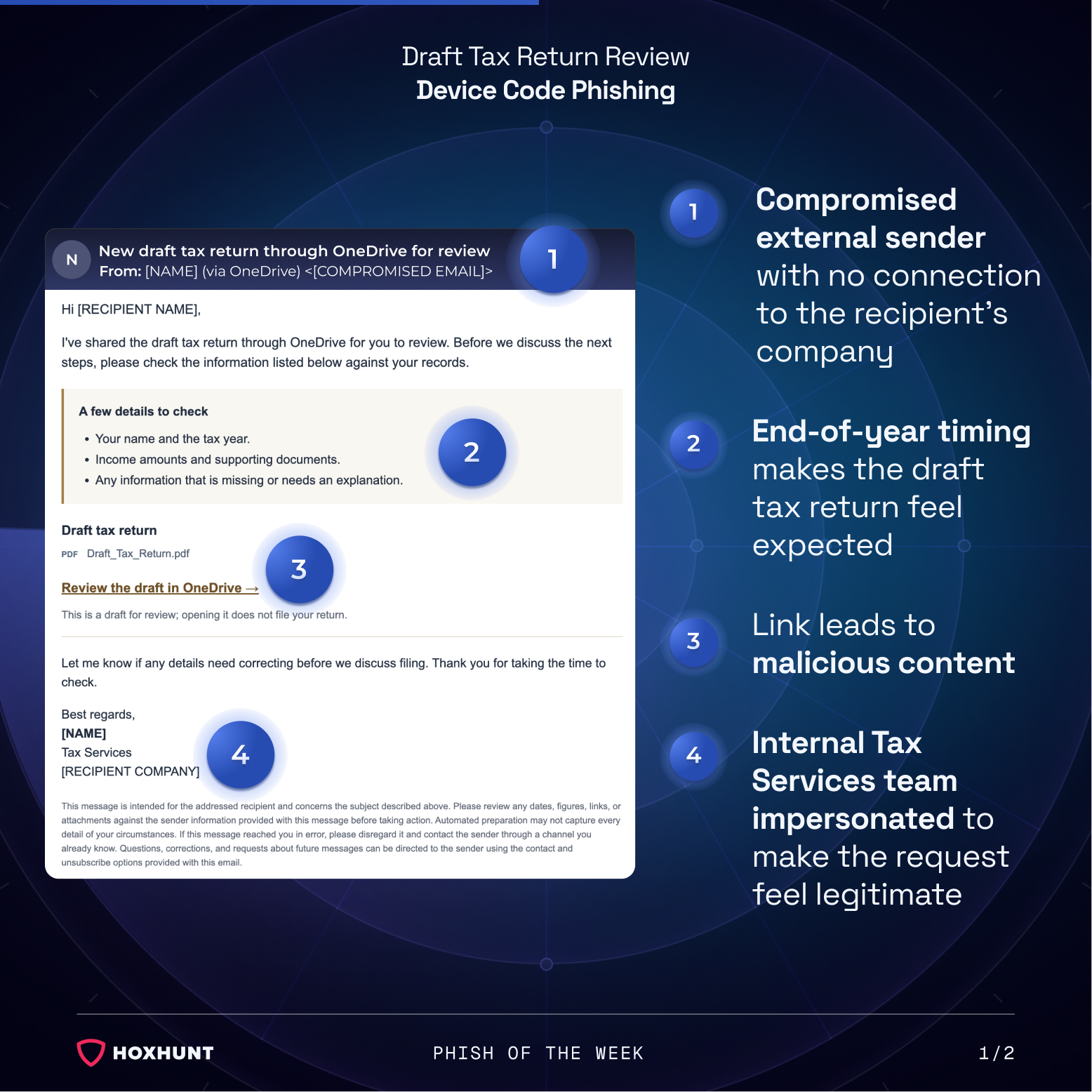
The email comes from a compromised external mailbox unrelated to the recipient’s company. The sender’s display name ends in “(via OneDrive)”, so the message looks like an automated file-sharing notice, and the subject line announces a new draft tax return for review. At the end of the year, that kind of document reads as expected paperwork rather than a surprise.
The body asks the recipient to compare the shared draft with their own records ahead of a follow-up discussion. The signature names Tax Services at the recipient’s own company, even though the email comes from outside it. A long, generic disclaimer at the bottom completes the look of routine corporate mail.
The link opens a landing page with a OneDrive banner across the top. Instead of the tax return, it shows a document called “Memorandum of Sales”, presented as an encrypted message that requires the recipient to confirm their identity through a Microsoft sign-in. The code for that step is already on the page, labeled as a one-time passcode, and a footer credits the encryption to “Microsoft Office 365”.
Selecting “Continue with one-time passcode” opens a pop-up window with Microsoft’s genuine sign-in page, which asks for a code to allow access.
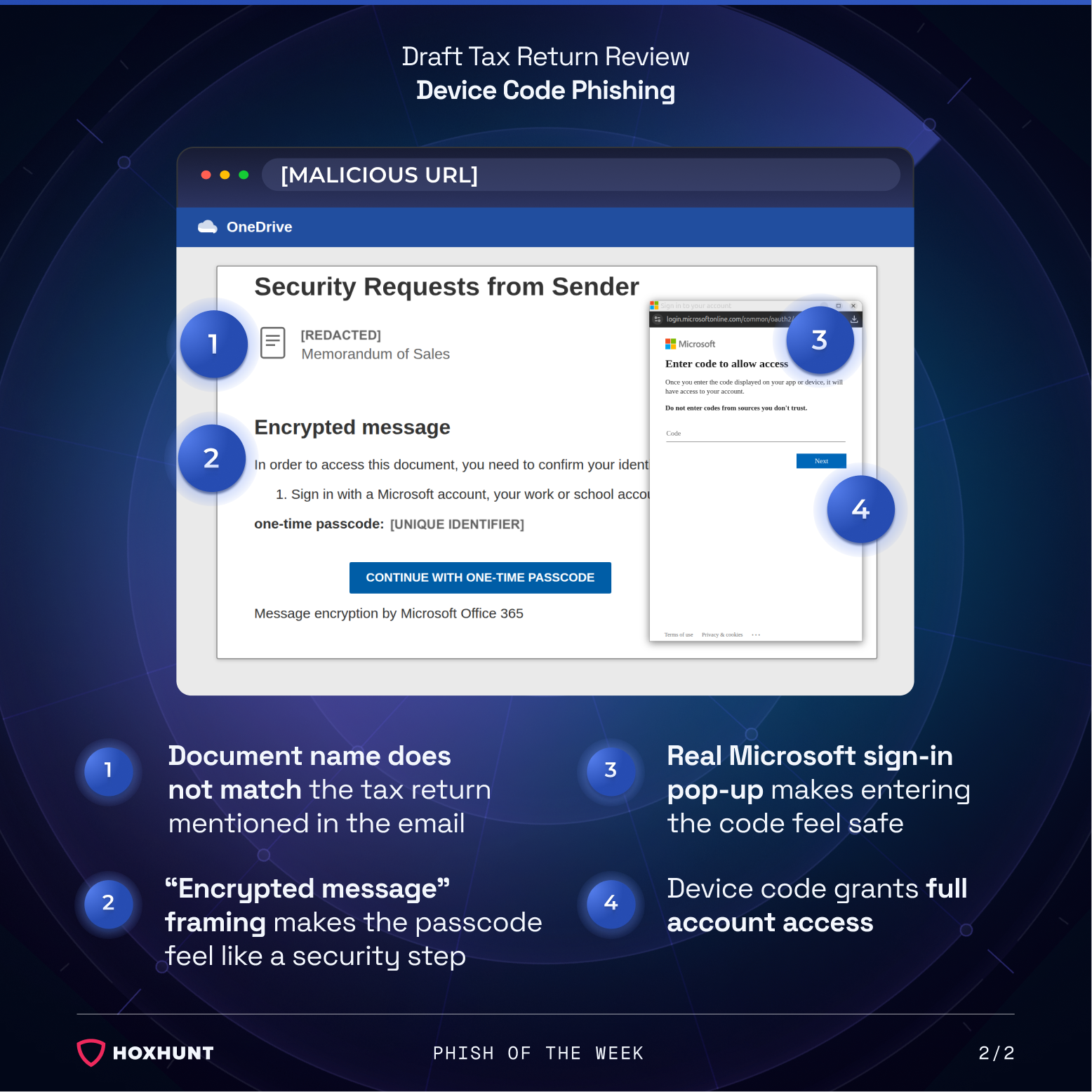
The "one-time passcode" is actually a Microsoft device code. Device codes let people sign in on hardware with limited keyboards, such as smart TVs or printers, by typing a short code on a phone or computer. In device code phishing, the attacker requests one of these codes for their own device and displays it on the landing page.
When the recipient types the code into the pop-up and finishes signing in, including any multi-factor authentication (MFA) prompt, they approve a sign-in from the attacker’s device instead of unlocking a document.
Why the attack works:
The standard advice to check the web address before typing anything does not help here. The landing page never asks for a password, and everything the recipient types goes into Microsoft’s own sign-in page, where the address checks out. The recipient also completes any MFA prompt, so the safeguard ends up confirming the attacker’s access instead of blocking it.
The passcode framing removes the last reason to hesitate. Microsoft’s real encrypted email service lets people open protected messages with a one-time passcode, so the request looks like a familiar security step. The sign-in page does warn against entering codes from untrusted sources, but this code appears to come from Microsoft itself, which makes the warning easy to dismiss.
How to spot similar attacks:
- The email claims to come from an internal Tax Services team “via OneDrive”, but the sender address is external and has no connection to the recipient’s company.
- A draft tax return arrives for review even though the recipient never asked anyone to prepare one.
- The landing page names a different document from the one the email promised.
- Instead of sending a one-time passcode to the recipient’s inbox, the page shows one on screen.
- The Microsoft pop-up says the code will give an app or device access to the account, which has nothing to do with opening a file.
To check a shared file, open OneDrive directly instead of following the email link, and only enter a code on Microsoft’s sign-in page when you are setting up a device or app yourself.
What is Phish of the Week?
Phish of the Week is a weekly content initiative by Hoxhunt’s Threat Operations team. Each week, we highlight a current phishing trend or notable real-world attack, covering what the threat is, how it works, and what to watch for to spot similar attacks in the future. The goal is to build consistent recognition of evolving phishing themes and tactics over time.
Comments (0)
Popular

Dive in