

Phish of the Week
November 16, 2026
Phish of the Week 16th of November

# Phish of the Week
# Phishing
Attackers use a quarantined message from a supposed internal sender to push recipients toward a credential harvester.

Mette Luntama
Phish of the Week: Microsoft 365 Quarantine Notice Impersonation with Credential Harvester
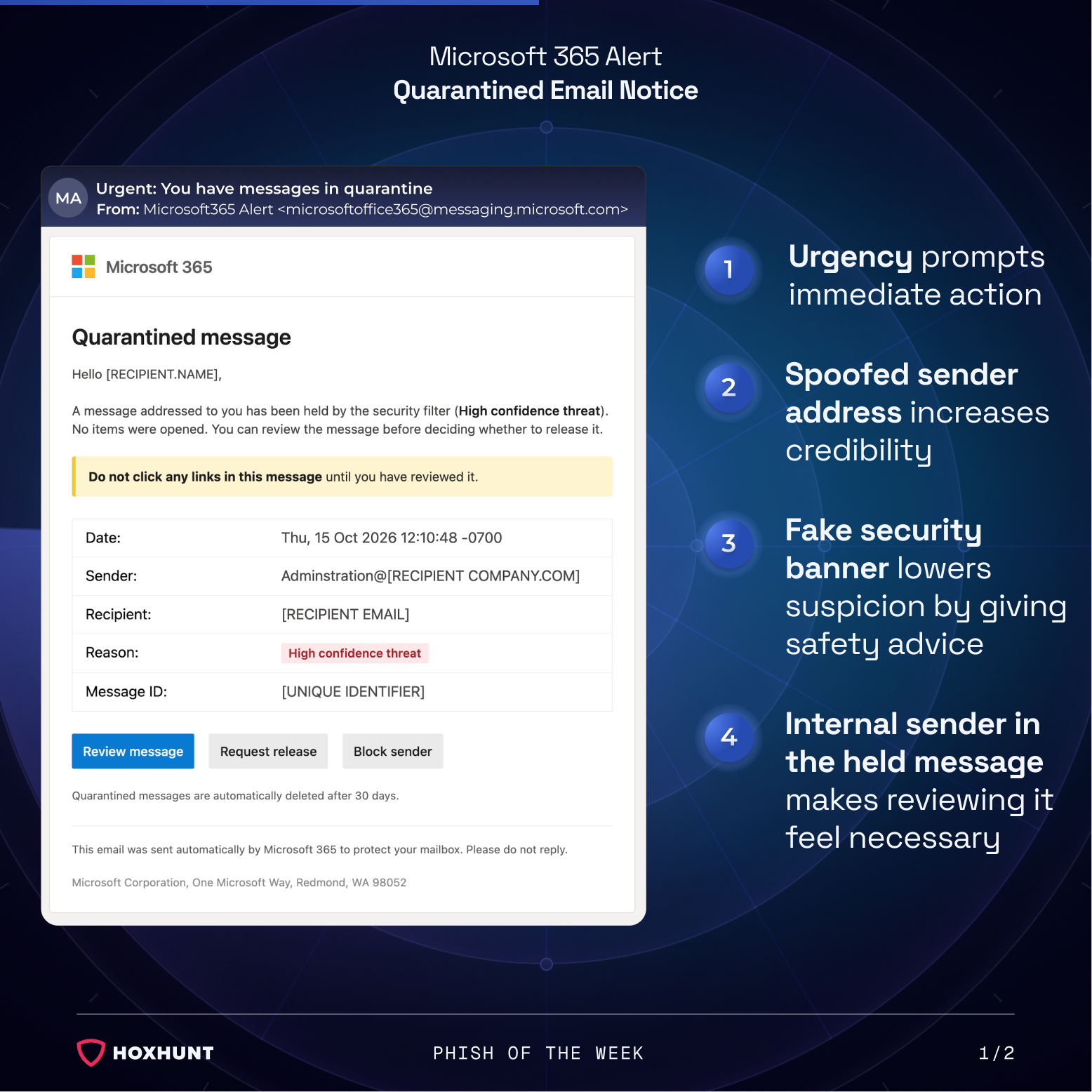
This credential phishing campaign impersonates a Microsoft 365 quarantine notification, the automated alert employees get when their email security filter holds a message. By claiming that a message from an internal administrator was flagged as a high confidence threat, the attack makes reviewing it feel like a necessary work task.
How the attack works:
The recipient receives an email with the sender name being “Microsoft365 Alert” and the address being spoofed to look like it comes from a Microsoft messaging domain. The body copies the look of a real Microsoft 365 notification.
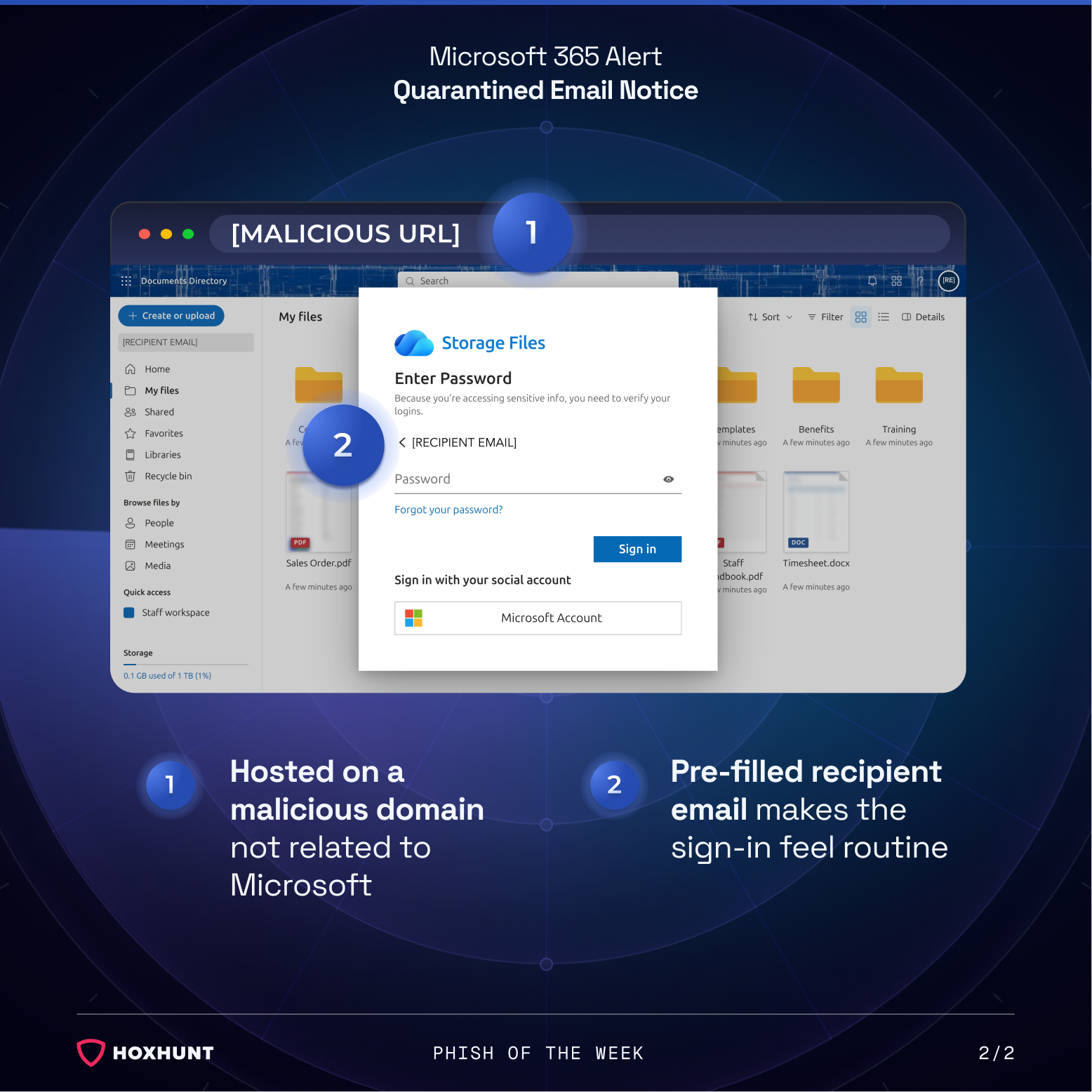
The email says a message addressed to the recipient was held by the security filter and that no items were opened. The sender of the held message appears as an administration address on the recipient’s own company domain. Selecting Review message opens a page hosted on a malicious domain that has no connection to Microsoft.
The landing page shows a dimmed cloud storage interface with folders and files. On top of it sits a fake sign-in pop-up, which says the recipient is accessing sensitive information and needs to verify their login.
The recipient’s email address is already filled in, so only the password field is left. Any password entered goes straight to the attacker.
Why the attack works:
Quarantine notices are among the few emails employees expect to come from their own security tools, so a message about a blocked threat reads as protection, not risk. This campaign leans into that expectation. The yellow fake warning banner telling the recipient not to click links sounds like advice from a security team, which makes the email itself feel like the safe part of the process.
The held message gives the recipient a reason to act. As it appears to come from an internal administration address, it suggests something work-related might be missed, and the 30-day deletion note implies that waiting could mean losing it. On the landing page, the pre-filled email address makes the sign-in feel routine, with nothing left to do except type a password.
How to spot similar attacks:
- The quarantine notice asks for action through buttons in the email instead of pointing to the portal where held messages are normally reviewed.
- Hovering over the buttons shows a link that does not lead to a Microsoft domain.
- The email warns against clicking links while asking the recipient to click a button to continue.
- The subject line adds “Urgent,” which is unusual for an automated quarantine notice.
- The held message’s sender address contains a spelling error (“Adminstration”), and the notice shows no subject or preview of the held message.
To check whether a message is really in quarantine, go to Microsoft 365 directly instead of using the buttons in the email.
What is Phish of the Week?
Phish of the Week is a weekly content initiative by Hoxhunt’s Threat Operations team. Each week, we highlight a current phishing trend or notable real-world attack, covering what the threat is, how it works, and what to watch for to spot similar attacks in the future. The goal is to build consistent recognition of evolving phishing themes and tactics over time.
Comments (0)
Popular

Dive in