

Phish of the Week
November 2, 2026
Phish of the Week 02nd of November

# Phish of the Week
# Phishing
Project Proposal

Mette Luntama
Phish of the Week: Dropbox Project Proposal Lure with Microsoft Device Code Phishing
This device code phishing campaign is sent from a compromised business account and uses a fake Dropbox file share to get recipients to sign in to Microsoft for the attacker. The attacker never asks for a password: the recipient is handed a code made by the attacker, and Microsoft’s own sign-in page does the rest.
How the attack works:
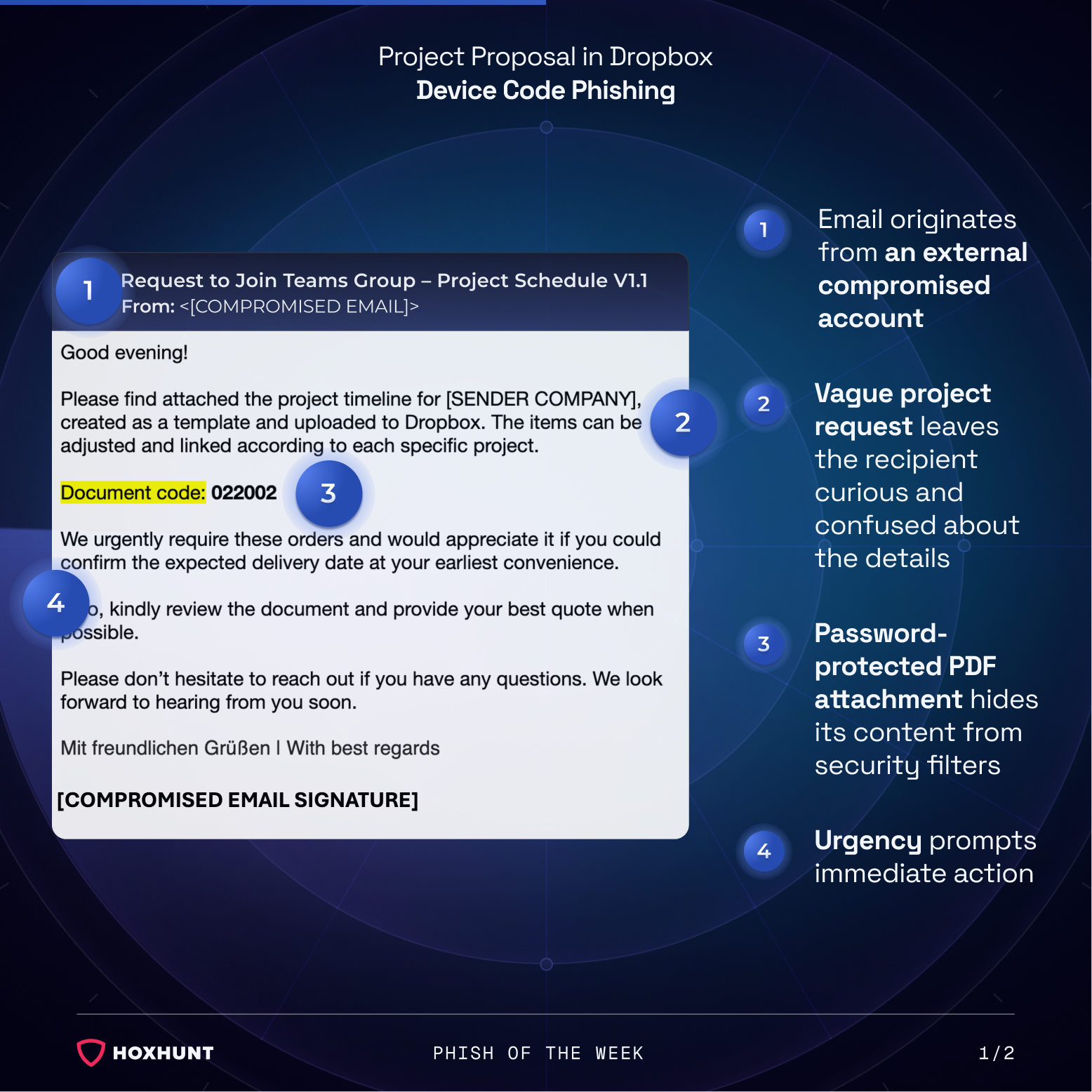
The recipient gets an email from a real external business account that has been compromised. The subject line reads “Request to Join Teams Group – Project Schedule V1.1”, but the body talks about a project timeline uploaded to Dropbox. The sender asks the recipient to confirm a delivery date and send a quote, and says they “urgently require these orders.”
The email has a password-protected PDF attached, and the password is given in the message as a “document code.” Because the file is locked, email security filters can’t scan what’s inside.
When opened, the PDF shows a “Project Proposal Request” with the name of the compromised sender’s company. It says a request for quotation has been shared through Dropbox and invites the recipient to click a “View Details” button.
The button opens a malicious page that uses real Dropbox branding. The page lists several locked files. To unlock them, the page shows a “verification code” with a Copy Code button and tells the recipient to sign in with it.
This code is really a device code. Device code authentication is a legitimate Microsoft sign-in method built for devices that can’t easily show a sign-in page, such as smart TVs or printers. The device shows a short code, and the user types it into Microsoft’s sign-in page on another device to approve access. In this attack, the attacker starts that process and passes their code to the recipient.
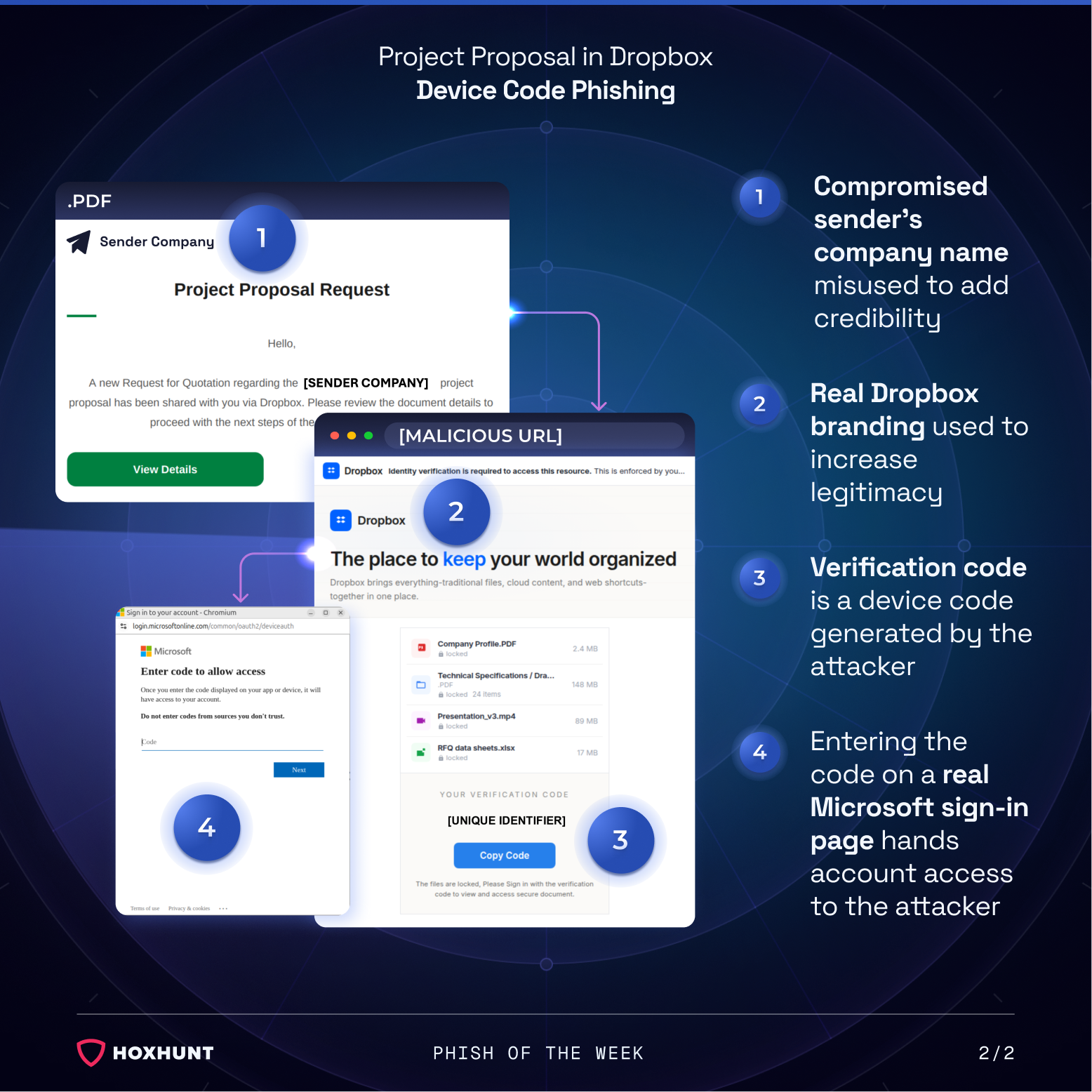
The recipient is then sent to the real Microsoft “Enter code to allow access” page. Once they enter the code and finish signing in, including any MFA prompt, Microsoft gives the attacker’s session access to the recipient’s account.
Why the attack works:
The last step of this attack happens on a page that is completely real. Many people have learned to check the web address before signing in and to be careful about entering a password on an unfamiliar site. Here the address belongs to Microsoft, no fake login form is involved, and the recipient approves the sign-in with their own MFA. Even the warning on Microsoft’s page, which says not to enter codes from sources you don’t trust, is easy to miss because the Dropbox page has already presented the code as a normal verification step.
The lure is also easy to believe for anyone who handles orders, suppliers or sales. A quote request from an existing business contact is a routine task, and because the email comes from that contact’s real account, it doesn’t stand out. The password-protected PDF keeps the rest of the attack hidden from filters until the recipient opens it.
How to spot similar attacks:
- An unexpected project, order or quote request from an external contact, with few concrete details
- A subject line that doesn’t match the email content
- A password-protected attachment with the password included in the same email
- Urgent wording that pushes for a quick reply on an order you weren’t expecting
- A file sharing page that asks you to copy a code into a separate sign-in page
- A prompt to enter a code on a Microsoft sign-in page when you didn’t start a sign-in yourself
To view a shared file, open Dropbox directly instead of following the attachment, and only enter a code on a Microsoft sign-in page if you started the sign-in yourself.
What is Phish of the Week?
Phish of the Week is a weekly content initiative by Hoxhunt’s Threat Operations team. Each week, we highlight a current phishing trend or notable real-world attack, covering what the threat is, how it works, and what to watch for to spot similar attacks in the future. The goal is to build consistent recognition of evolving phishing themes and tactics over time.
Comments (0)
Popular

Dive in