

Threat studies
July 15, 2026
Recruitment Phishing
# Phishing
# Threat Studies
When a job offer feels too good to be true

Mette Luntama
What is recruitment phishing?
Recruitment phishing is a social engineering tactic in which cybercriminals pose as recruiters and well-known companies to target job seekers. The goal is to steal credentials, personal information, sensitive company data, or even money.
What makes recruitment phishing particularly effective is its illusory sense of relevance and personalization. The attack feels as if a recruiter reached out specifically to the recipient due to their experience and skills, yet the underlying template is almost always generic and reused across countless targets and impersonated brands. The apparent recruiter's identity may either be completely imaginary or a real person whose name and photo were scraped from LinkedIn or a company website; a familiar name or face is no longer a reliable trust signal.
The excitement and flattery of being headhunted can make it challenging to stop and think critically before acting. This is compounded by the fact that these messages often feature look-alike domains closely mimicking the impersonated brand, or arrive from legitimate third-party platforms that lend their own layer of credibility despite having no affiliation with the company being impersonated.
Most recruitment phishing campaigns share a common pattern: a convincing lure, a sense of urgency or excitement, and a credential harvesting page waiting at the end.
An old technique making a comeback: Browser-in-the-Browser
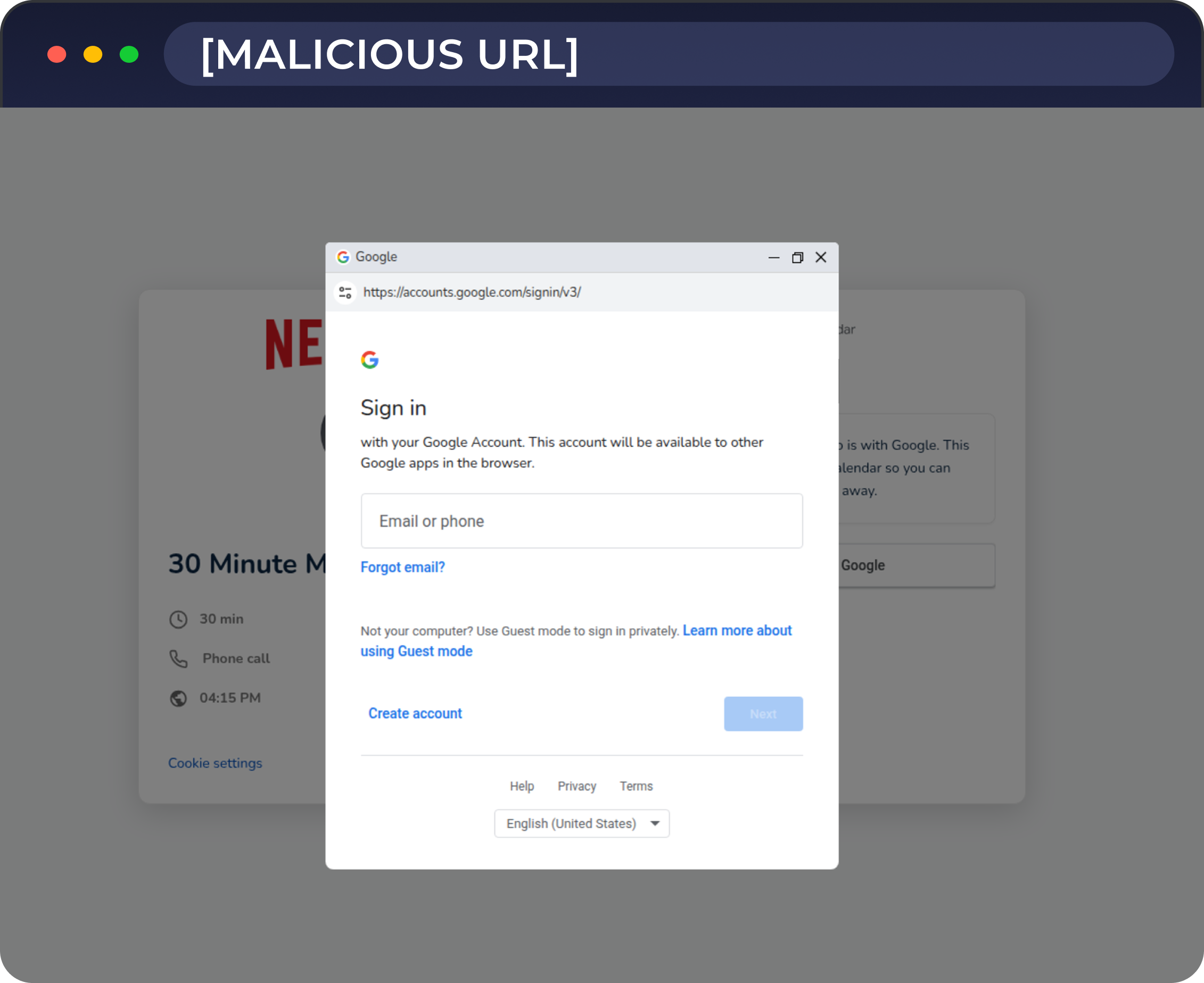
Increasingly, attackers are deploying the Browser-in-the-Browser (BitB) technique: rather than redirecting the recipient to a separate phishing site, a fake browser pop-up appears directly on the landing page, complete with a spoofed address bar showing a legitimate-looking URL. The fake pop-up window is often disguised as a single sign-on prompt on a recruitment portal, crafted to look exactly like the impersonated company's real portal. It looks and behaves almost like a real sign-in prompt, but it's entirely controlled by the attacker.
In spring 2026, BitB has become a notably more common component of recruitment phishing campaigns, particularly targeting Google credentials, making the fake login experience harder than ever to distinguish from the real thing. Here's how this played out in recent examples:
Recruitment phishing in the wild
Schedule a meeting: Browser-in-the-Browser
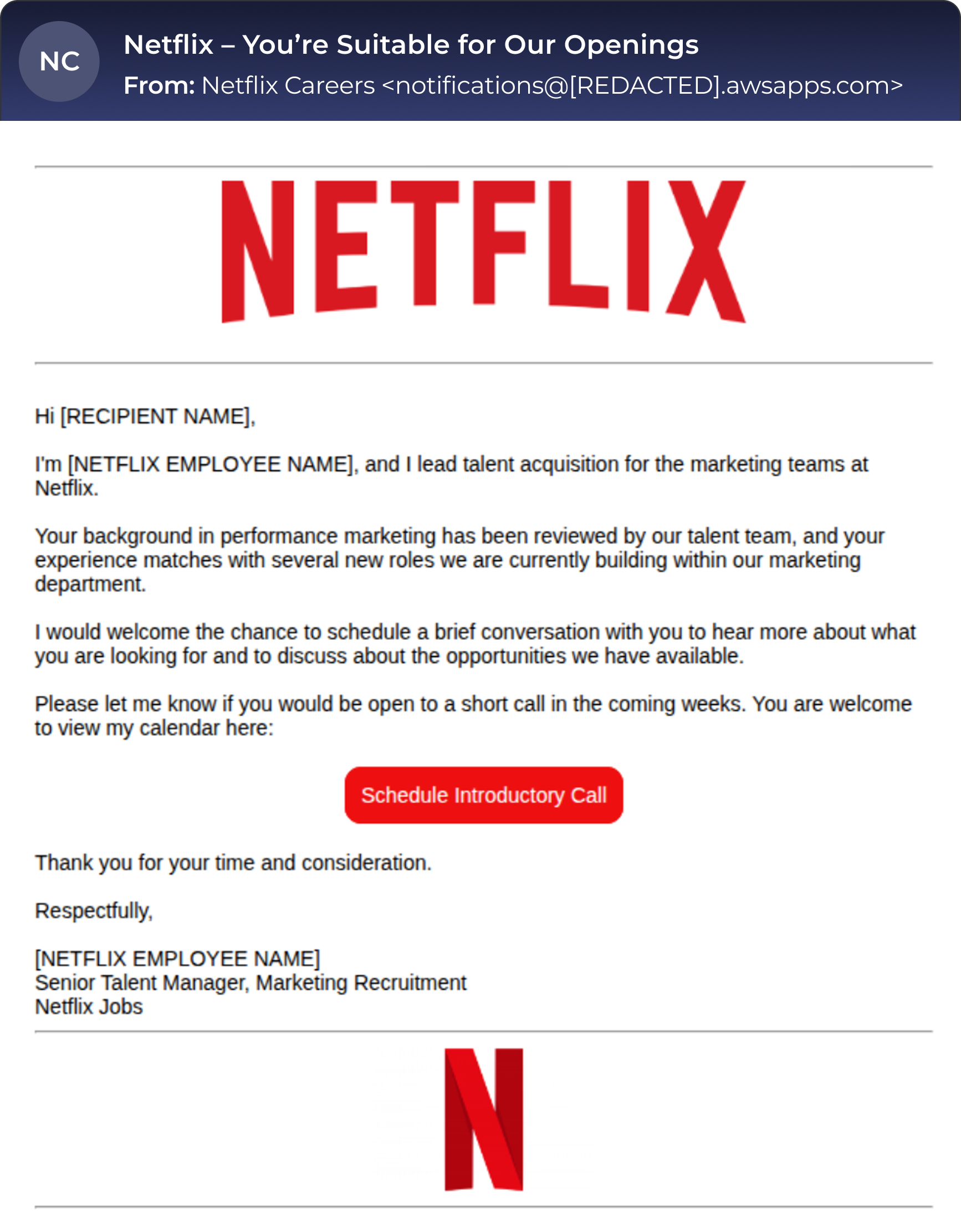
Scheduling an introductory call is a common recruitment lure. In this campaign, the recipient receives a professional-looking email impersonating Netflix (Figure 1) and is invited to book a meeting via a fake meeting scheduling page.
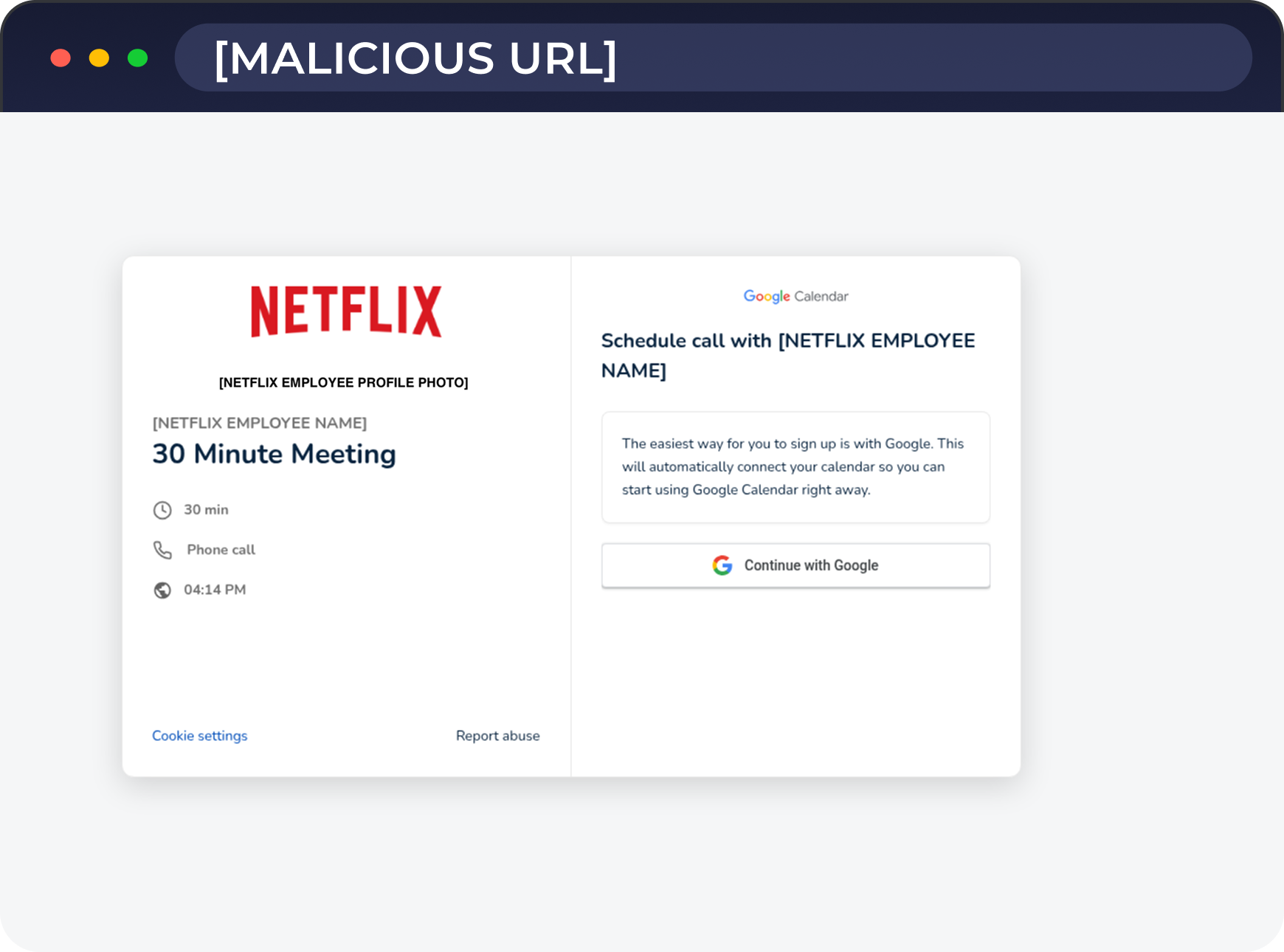
The only functional action on the malicious page is a Continue with Google button (Figure 2). Clicking it triggers a pop-up window showing a Google login prompt with a legitimate-looking URL in the address bar (Figure 3). That window is not real. It is a BitB imitation rendered by the malicious page itself, and everything entered into it goes directly to the attacker.
Third-party service misuse
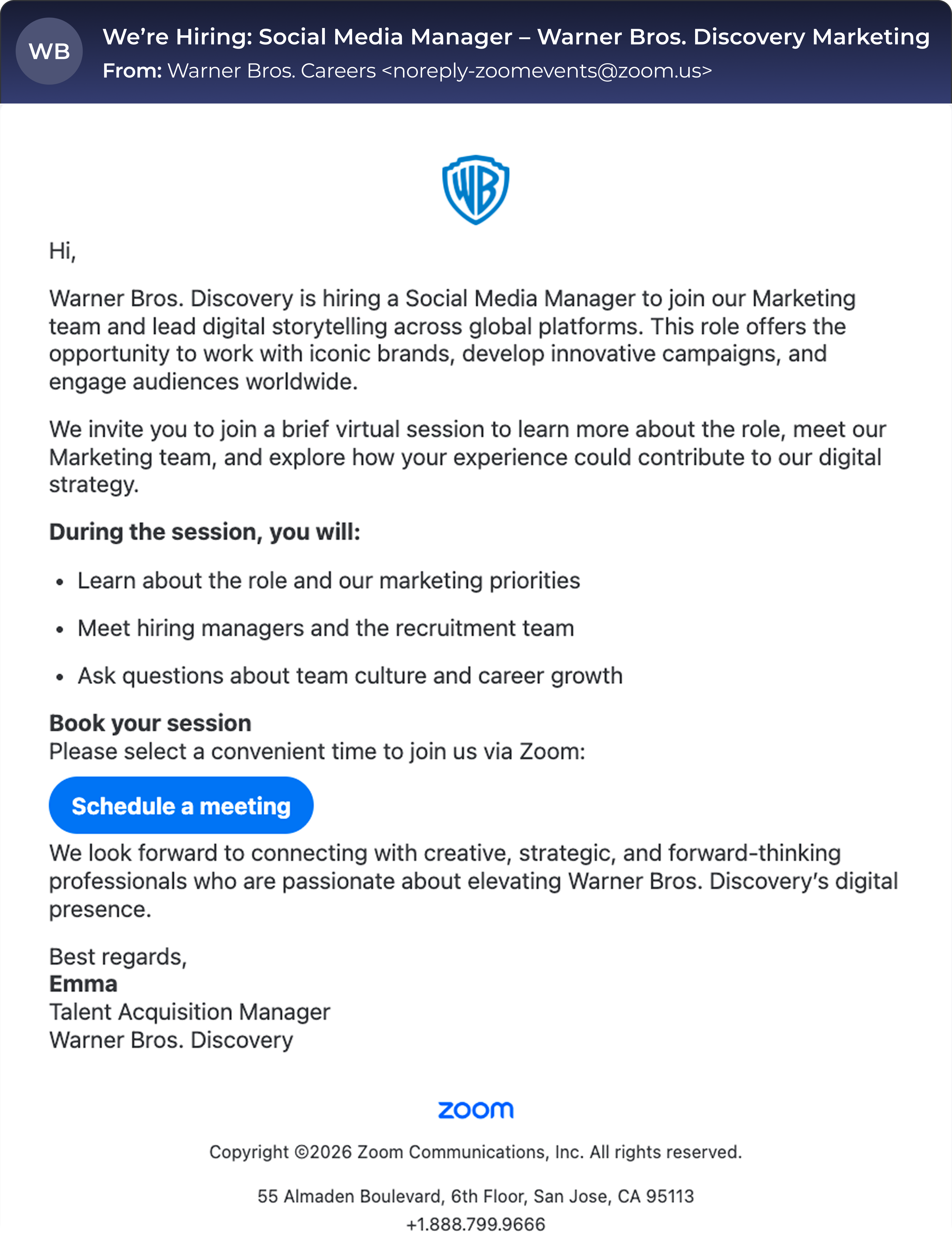
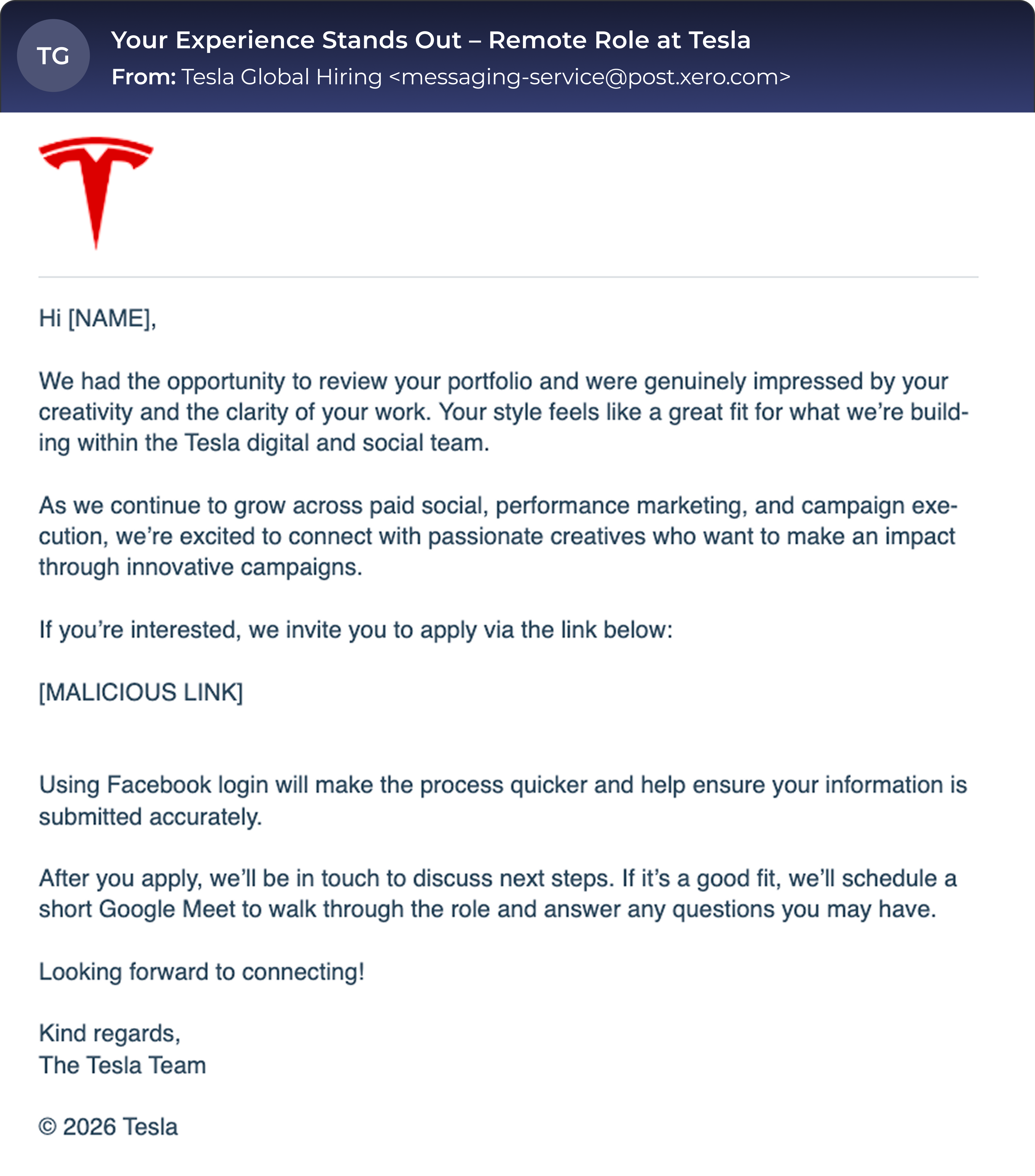
Attackers don't always send phishing emails from their own infrastructure. Legitimate services like Zoom, Xero, Salesforce, and others can be misused to deliver recruitment phishing that bypasses spam filters and looks trustworthy at first glance. The examples of real campaigns below (Figures 4 and 5) show recruitment emails impersonating well-known brands, delivered through third-party services.
Look-alike landing page
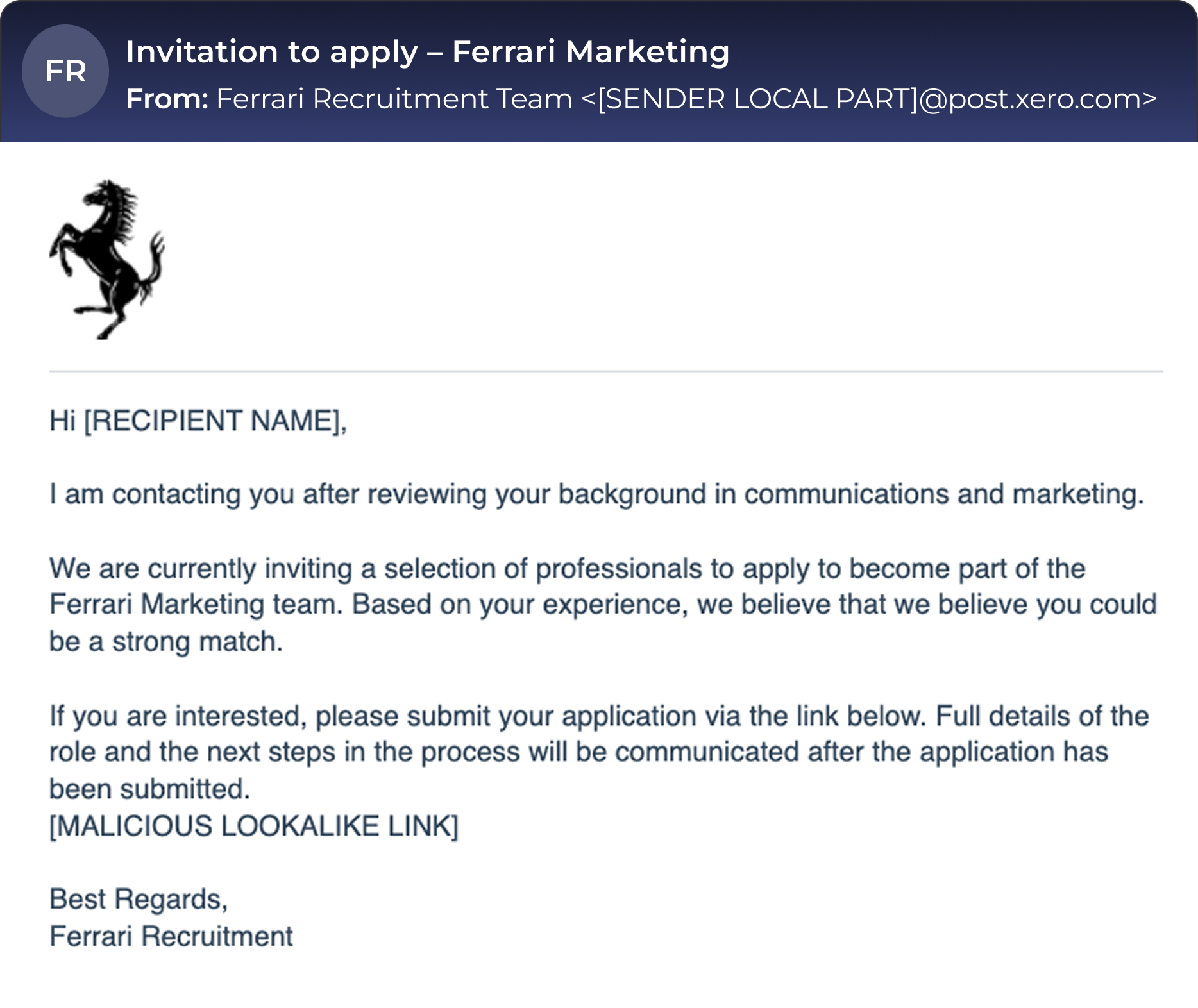
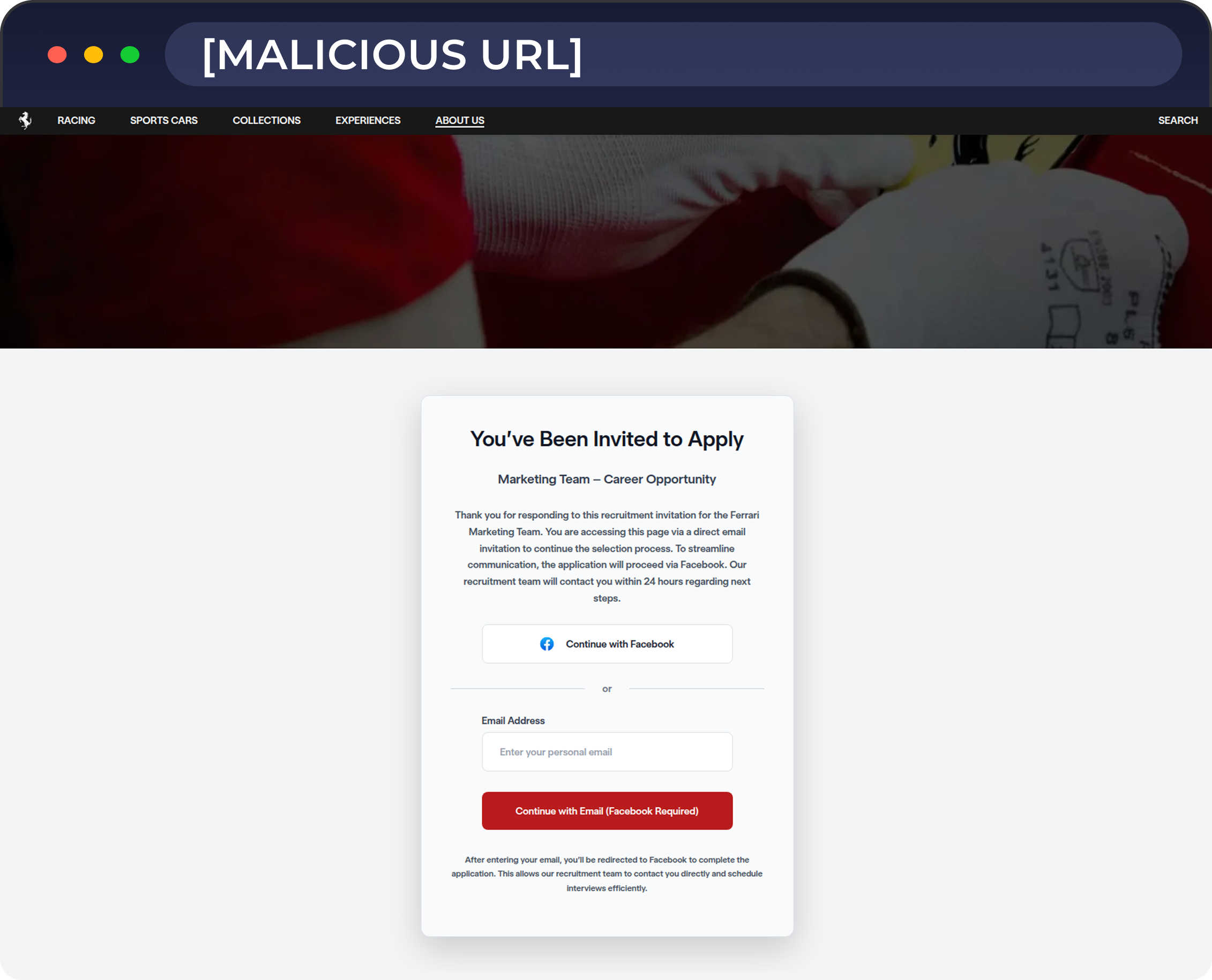
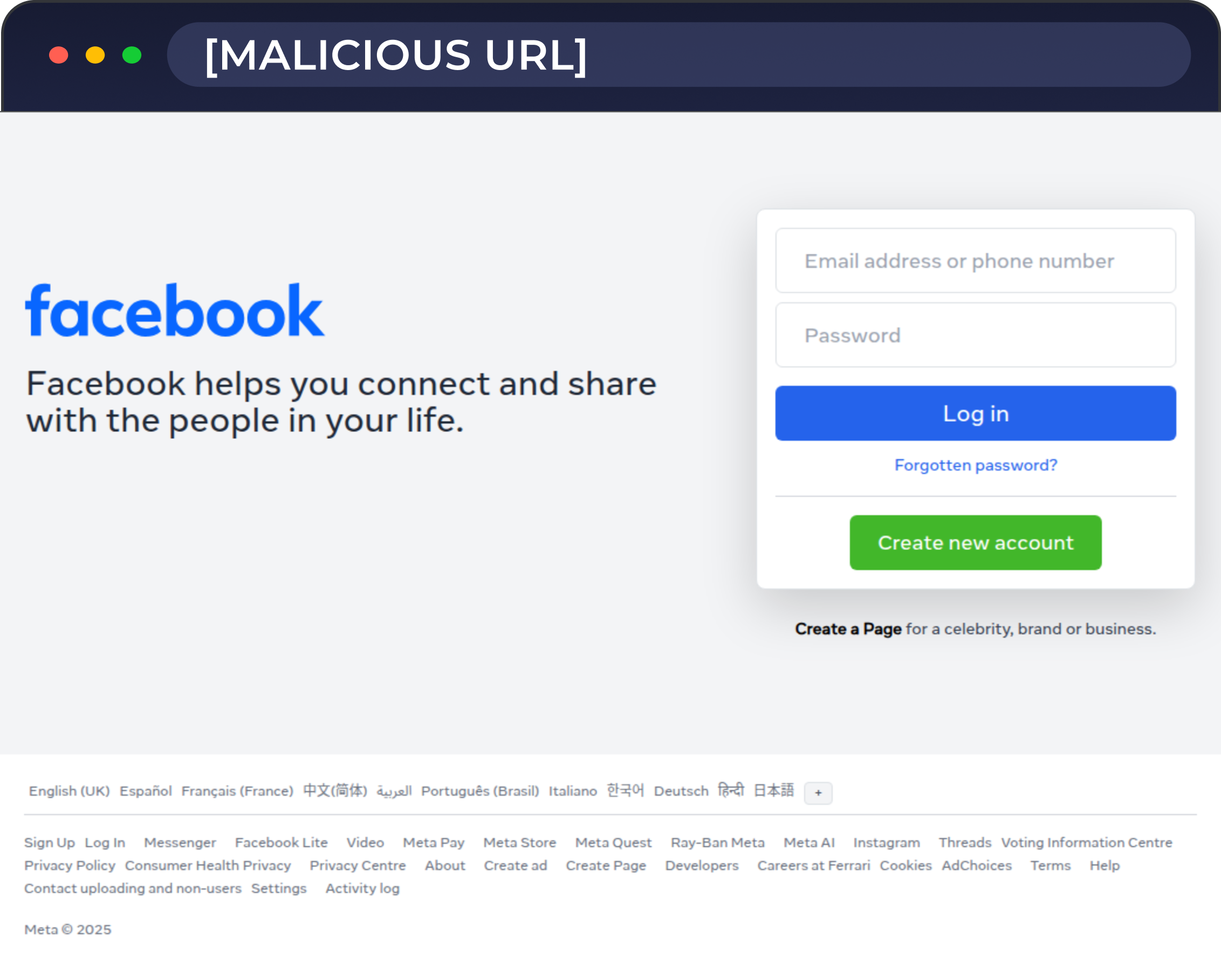
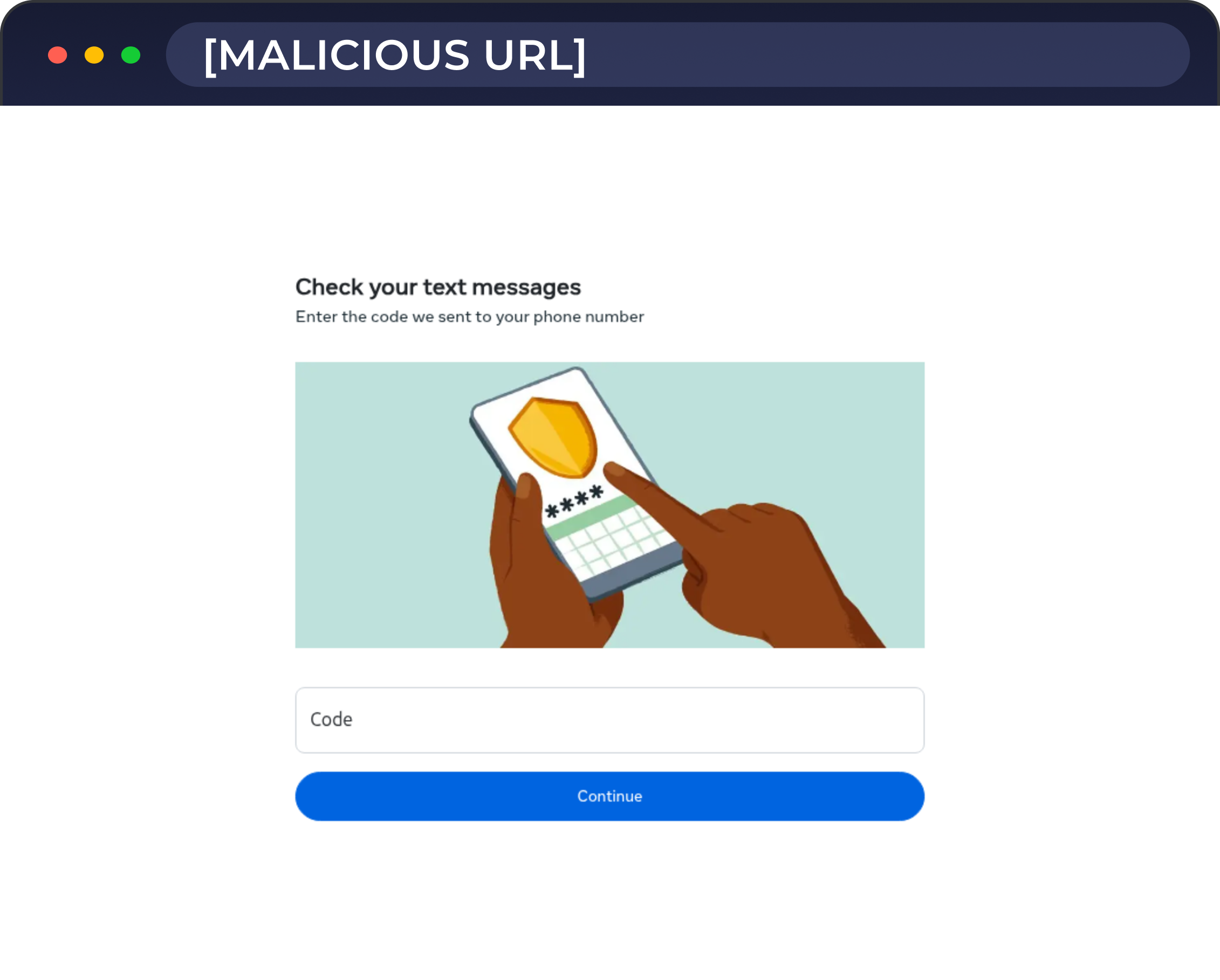
Some attackers go a step further and build a replica of the impersonated company's actual careers or recruitment website. In this campaign, the recipient receives a phishing email impersonating Ferrari, with a link to what appears to be an application portal (Figure 6). The landing page is a replica of Ferrari's actual careers site, but hosted on a malicious domain (Figure 7). The look-alike page may look and feel entirely legitimate; the navigation links may even redirect to the real company website, but the application process is a trap. Continuing to apply leads the recipient to a fake Facebook login page (Figure 8), and after entering their credentials, the page also asks for a multi-factor authentication (MFA) code, giving the attacker everything needed for a full account takeover (Figure 9).
Why are recruitment phishing attacks dangerous
Designed to bypass your instincts
Recruitment phishing is dangerous because it exploits a very human set of impulses. Being headhunted by a well-known company is exciting, and that mix of flattery, opportunity, and a nudge of urgency is exactly what the attacker is counting on. Critical thinking can be suppressed by a moment of excitement: the recipient acts fast to secure the opportunity before stopping to question whether the email actually makes sense.
Checking the sender’s background is no longer enough, as attackers can do the same research you would. It's trivial to scrape the names of real recruiters from the internet, and an email that references an actual person, arrives from a plausible domain, and links to a convincing replica of a careers portal is genuinely difficult to see through at first glance. Few people's first instinct is to verify the recruiter's identity through a separate channel.
The illusion of personalization seals it. The email often starts with the recipient’s name and leans on flattering but deliberately vague language: "impressed by your background," "your expertise caught our attention," "your experience aligns perfectly with what we're looking for." It sounds like someone took the time to evaluate the recipient specifically. In reality, these phrases are interchangeable filler; nothing in them actually distinguishes the person from thousands of other recipients who received the exact same message.
The brand does most of the work
Companies like Google, Tesla, Amazon, Ferrari, Nike, and Starbucks invest millions in getting the public to trust them, and attackers take full advantage of that. When the recipient sees a familiar logo and branding on a landing page, their guard drops.
Attackers also exploit real-world events and timing. Relevant, high-visibility events make ideal lures because the brand is already top of mind and the outreach feels timely rather than random. In late spring 2026, multiple campaigns leveraged the FIFA World Cup, luring marketing and social media professionals with job opportunities, free ticket giveaways, or a chance to enter an exclusive bundle prize draw. These a prime examples of brand recognition and cultural momentum being weaponized at once. (See this Phish of the Week for more details on one of the campaigns.)
Look-alike domains and cloned websites
Attackers register domains that closely resemble impersonated brands, typically combining the company name with words like "careers," "talent," or "recruitment." Paired with a perfect clone of the company's actual careers portal or a scheduling page such as Calendly, these can be extraordinarily convincing. At the time of use, these domains are often only days or weeks old, but checking domain registration details isn't something most people know or think to do in the moment.
How to spot recruitment phishing
Start with the sender
The first question is simple: who is the email actually from? Check both the display name and the actual email address. The display name might say "Google Talent Acquisition" while the sending domain is something else entirely. Does the domain match the company's official website exactly, or is it a close variation? Is the email routed through a third-party service? Legitimate recruiters at major companies don't typically cold-contact candidates through generic mailing platforms; that alone is worth a pause. Also look for inconsistencies between the sender name, the signature, and the email address itself.
Even if everything appears to be legitimate, keep in mind that display names and sender addresses can be spoofed. Consistent details are a good sign, but not a guarantee.
Look at the message itself
Recruitment phishing templates are designed to feel personal while being sent out to thousands of different people. The role description is usually vague, the compliments are generic and there's nothing that actually speaks to you specifically. Legitimate recruiters also don't typically ask you to move the conversation to WhatsApp or Telegram, respond within 24 hours, or submit financial details before a proper interview.
Pay attention to the role being offered too. Marketing, social media, and communications positions are common lures not only because they appeal to a broad audience, but because compromising a target working in such a role can give attackers access to company ad accounts, social media pages, and publishing tools. More targeted campaigns may have scraped your actual job title from LinkedIn and tailored the pitch accordingly. If you weren't looking for a new role and a perfect opportunity appears out of nowhere from an unsolicited message, treat it with extra skepticism.
Pause before you proceed
If you followed a link from the email, take a moment before doing anything else. Check the URL again: does it match the company's official domain? Can you find the same job listing by navigating to the company's official site independently, or does it only exist via the link you were sent?
Then look at what the page actually does. A real company careers site typically has navigation, job listings, an about page, and a privacy policy, and all of it works. On a phishing page, the login form is often the only thing that actually functions. Other buttons may exist for appearances, but clicking them leads nowhere, throws an error, or quietly redirects to the real company's official site on a different domain. If the only thing you can do on the page is enter your credentials, that's a strong signal something is wrong.
Verify through another channel
If an opportunity seems too good to be true, it might be exactly that. If you're actually interested in the position, verify the outreach through a completely separate channel. Look up the company’s official contact details independently, not from the email itself; find the recruiter through a trusted source; or simply call the company directly. Anyone who genuinely wants you on their team won't mind you doing your due diligence.
Key takeaways
- Recruitment phishing exploits brand trust: the more recognizable the company, the more convincing the lure.
- The message feels personal; the template is not: vague flattery and generic role descriptions are a sign the same pitch went to thousands of others.
- A legitimate careers page has more than just a login form; if nothing else on the page works, treat it as a warning sign.
- If the opportunity is worth pursuing, verify it through a completely separate channel using contact details you found independently.
Comments (0)
Popular

Dive in
Related
Content
The Octopus Principle: What a Pink Octopus Taught Me About Security Awareness
By Ant Davis • Jul 6th, 2026 • Views 36
Content
The Octopus Principle: What a Pink Octopus Taught Me About Security Awareness
By Ant Davis • Jul 6th, 2026 • Views 36