

Phish of the Week
July 6, 2026
Phish of the Week 06th of July

# Phish of the Week
# Phishing
Mandatory Employee Training – HR Impersonation

Mette Luntama
Phish of the Week: HR Impersonation with a Dynamic Credential Harvester
This Phish of the Week features an HR impersonation attack disguised as mandatory employee training. The email uses a training-quiz format familiar from real onboarding and compliance tools, which lends the entire flow a sense of routine legitimacy before the recipient reaches the actual credential theft.
How the attack works:
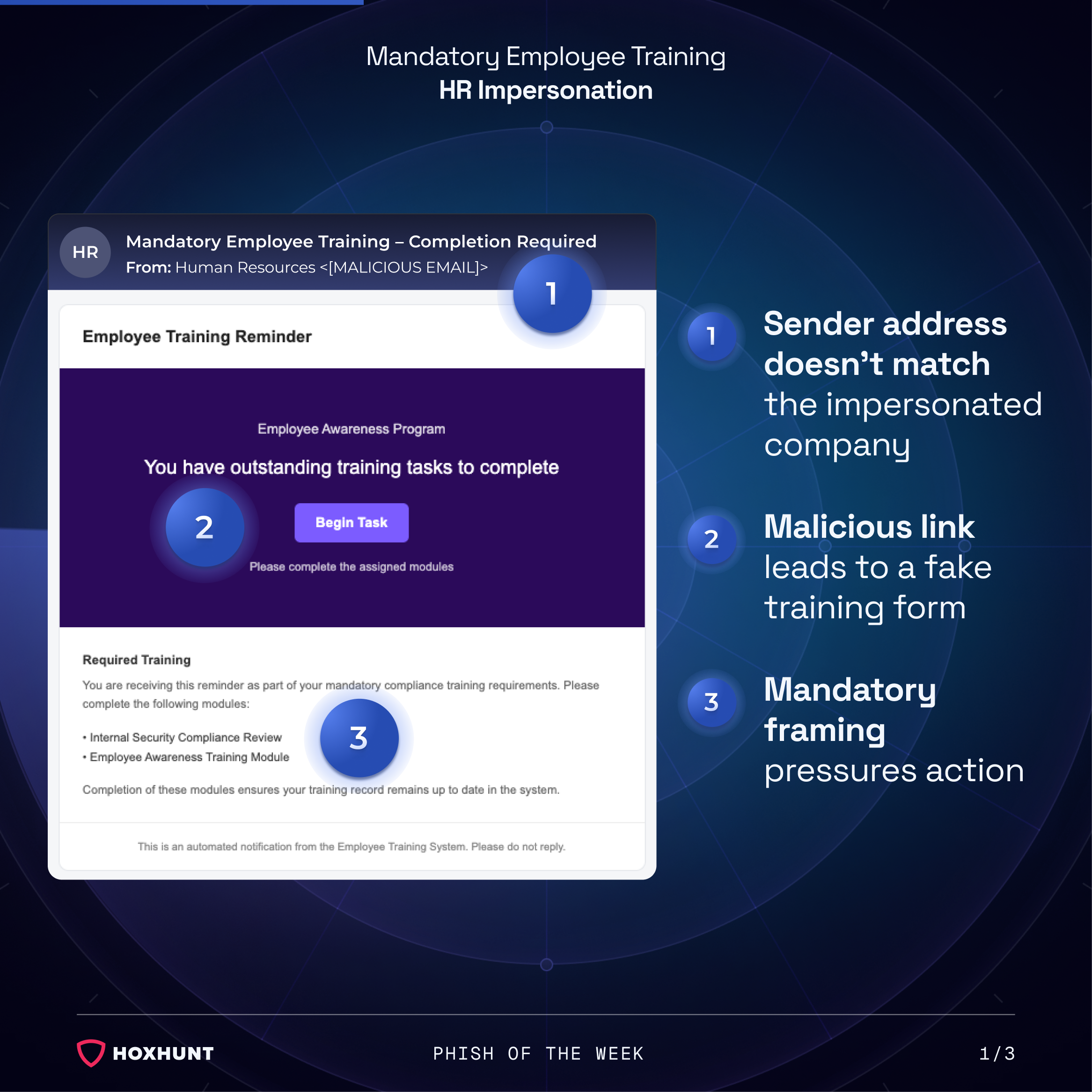
The recipient receives an email posing as an HR notification about mandatory employee training. The sender address does not match the impersonated company, and the message uses mandatory framing to pressure the recipient into acting quickly rather than verifying the request.
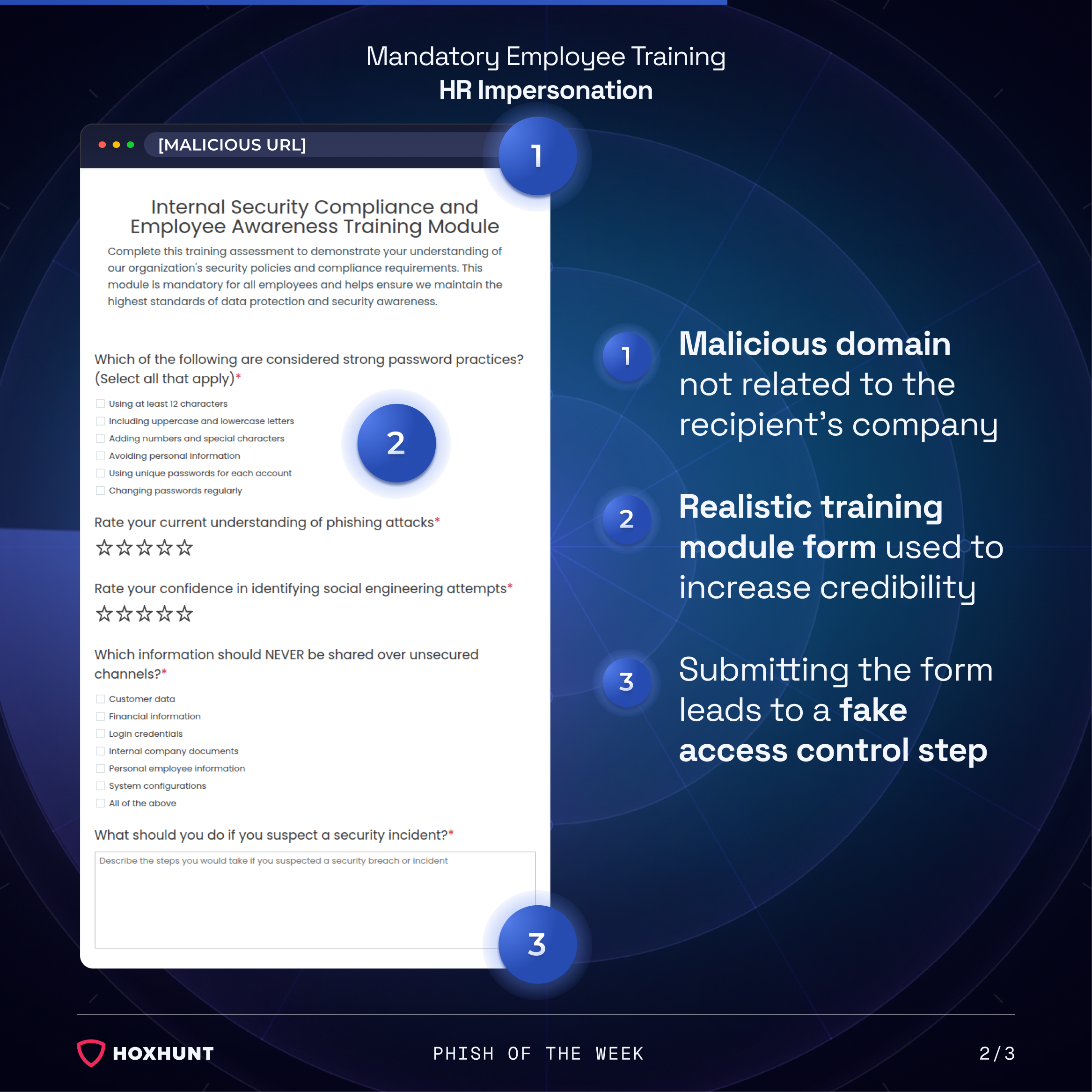
Clicking the "Begin Task" button leads to a landing page hosted on a domain unrelated to the recipient's company. The page presents a realistic "Internal Security Compliance and Employee Awareness Training Module," complete with quiz questions on password practices and incident response. This realistic form increases the credibility of the flow and primes the recipient to keep interacting with the site.
After the recipient submits the training quiz, the flow moves into a fake access control step. This transitions into a spoofed Microsoft "Secure Document Access Verification" page, which tells the recipient their document access is being verified and prompts them to click "Read Document." This step exists purely to make the sign-in prompt that follows feel like a natural continuation of a legitimate document-access process.
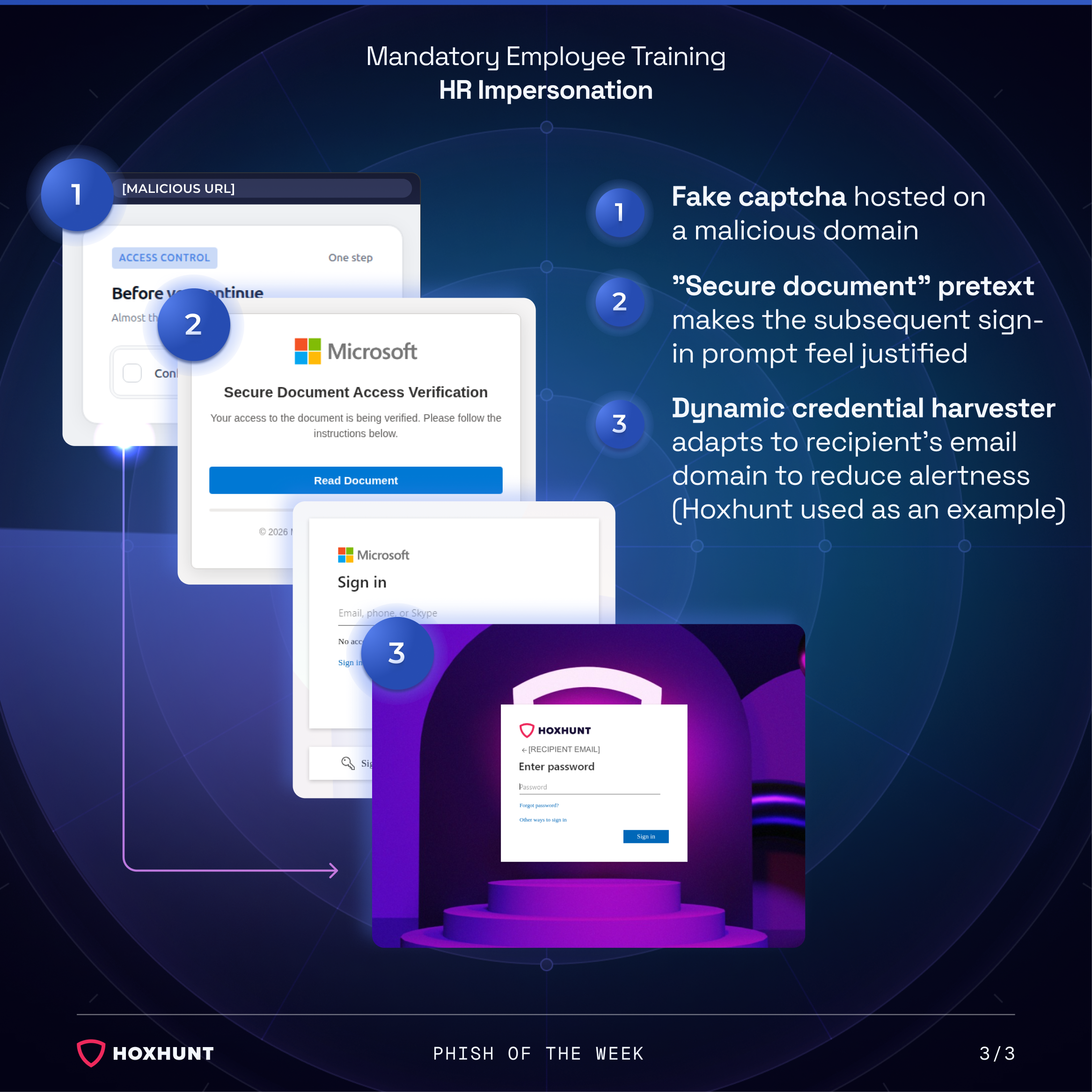
The recipient is then shown a spoofed Microsoft sign-in page, a dynamic credential harvester that rebrands itself using the recipient's own email domain. Hoxhunt was used as an example in this instance, but the page adapts automatically to whichever company's employees receive the email, making the sign-in prompt look native to their own organization.
Why the attack works:
Each stage of this attack is designed to reduce suspicion by the time the recipient reaches the actual credential harvester. The training quiz is not just filler content: it gives the recipient a task to complete, and completing tasks builds a sense of forward momentum that discourages stepping back to question the process.
The fake Microsoft "Secure Document Access Verification" screen is a particularly effective bridge. By the time the recipient sees a sign-in prompt, they have already been told their access is "being verified," so the login request feels expected rather than suspicious. This kind of staged pretext removes the moment of surprise that often triggers a recipient to pause.
The dynamic branding on the final credential harvester is the technical core of the attack's effectiveness. Because the page pulls the recipient's actual email domain and adjusts its visual identity accordingly, it bypasses one of the most common self-checks people use: looking for a mismatch between the branding on a login page and their own employer. When the page mirrors your own company's identity, that check no longer works.
How to spot similar attacks:
- The sender address does not match your organization's official HR or IT domain.
- A mandatory training notification arrives by email rather than through your company's official LMS or intranet.
- The training link leads to an external domain unrelated to your employer.
- A "document access verification" or similar interstitial step appears before a sign-in prompt, adding an unnecessary layer between you and the stated goal.
- The sign-in page uses your company's branding but was reached through an email link rather than a bookmark or direct navigation.
If you receive an unexpected training notification, navigate to your company's official intranet or learning platform directly instead of following the link in the email.
What is Phish of the Week?
Phish of the Week is a weekly content initiative by Hoxhunt's Threat Operations team. Each week, we highlight a current phishing trend or notable real-world attack, covering what the threat is, how it works, and what to watch for to spot similar attacks in the future. The goal is to build consistent recognition of evolving phishing themes and tactics over time.
Comments (0)
Popular

Dive in