

Phish of the Week
September 21, 2026
Phish of the Week 21st of September

# Phish of the Week
# Phishing
Fake Court Summons

Mette Luntama
Phish of the Week: Fake Court Summons Delivers Microsoft Credential Harvester
This attack impersonates a legal tribunal to threaten recipients with court enforcement action, delivered entirely through a PDF attachment rather than the email body itself. The fear of a default court order pushes recipients straight into a Microsoft credential harvester routed through a fake file-transfer page.
How the attack works:
The email arrives from what looks like some support account, but the address is a genuinely compromised external mailbox. It carries no message body of its own, just a subject line reading "Court-summons" and a single PDF attachment.
Opening the attachment reveals a fake notice from a "Special Tribunal," complete with an official-looking seal and a red "approved" stamp. The notice claims a default court order was granted against the recipient over unpaid remittance and warns that ignoring it will lead to "execution proceedings." A single button reading "view court order here" is the only way to respond.
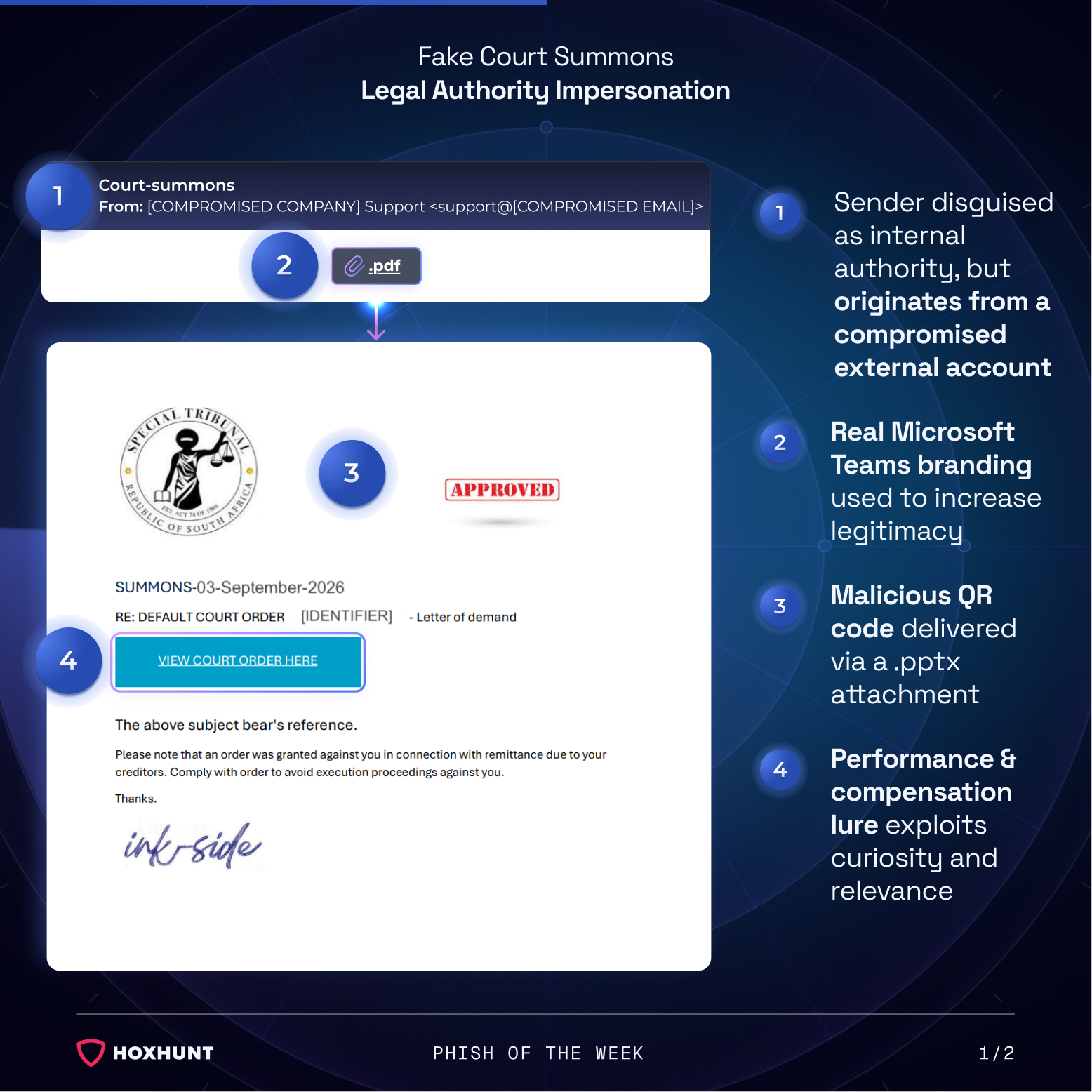
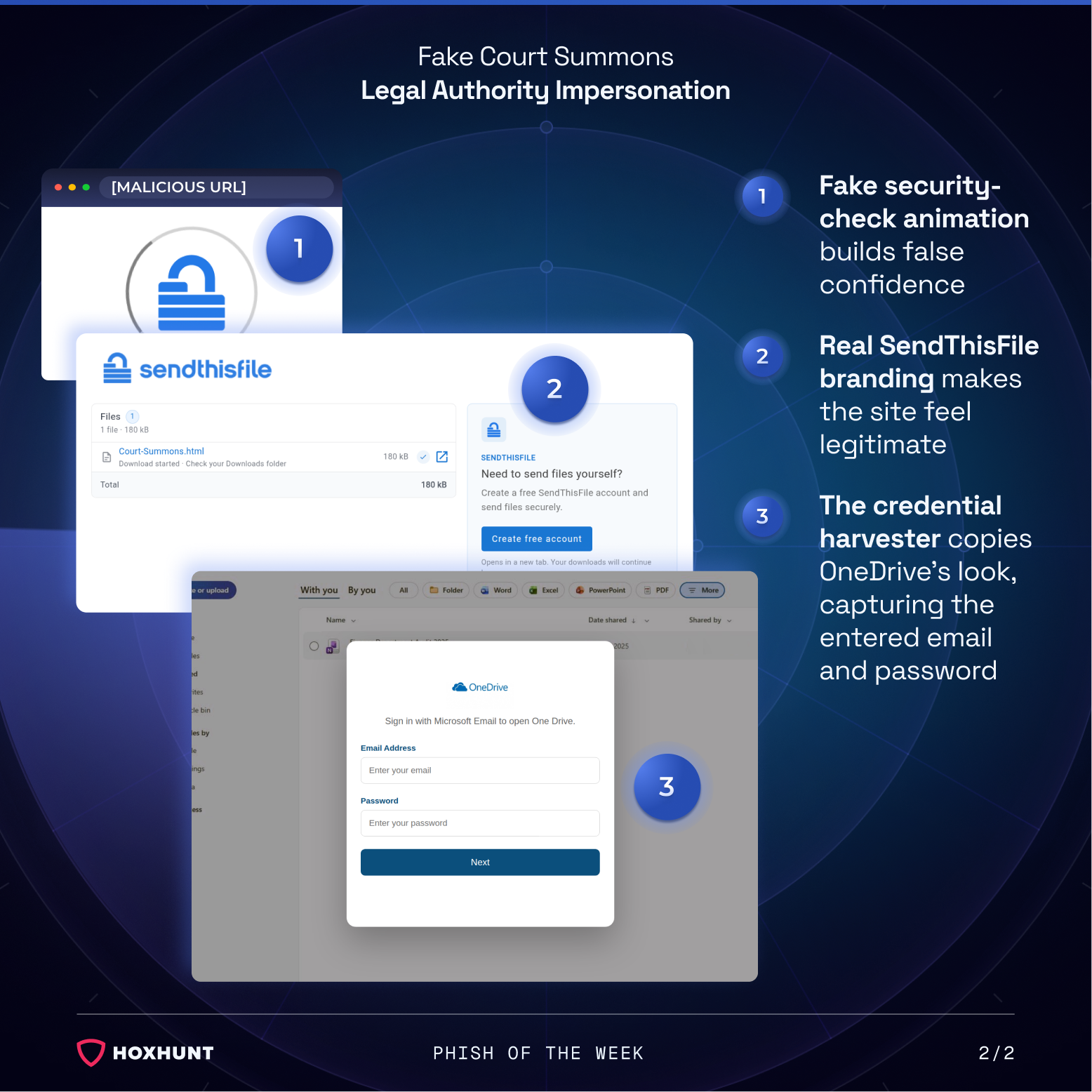
Clicking the button opens a brief loading animation, styled like a security check, before landing on a page branded as SendThisFile, a legitimate file-transfer service. The page shows a file named "Court-Summons.html" as if it were being securely downloaded.
Behind that page sits a pop-up styled as a OneDrive sign-in prompt, asking the recipient to enter their Microsoft email and password to open the document. Whatever is entered goes straight to the attacker.
Why the attack works:
The threat itself does most of the work. A claim that a court order has already been granted and that ignoring it leads to enforcement action creates the kind of fear that overrides the usual pause before opening an unexpected attachment.
Because the sending account is genuinely compromised rather than spoofed, the email passes the checks that normally catch impersonation: the domain is real, and there's no mismatch between the display name and address. Even if a recipient did notice an unfamiliar sender, a legal notice is one of the few email types where that barely registers, since a court, law firm, or debt collector could plausibly contact someone from an address they've never seen before. That combination, a technically clean sender paired with a pretext that excuses an unfamiliar one, means nothing about the message itself gives it away.
The steps between the attachment and the credential prompt add to the illusion. A loading screen and a page branded as a real file-transfer service make the process feel like a normal, if slightly clunky, document retrieval rather than a shortcut into a login form, so by the time the OneDrive prompt appears, the recipient has already accepted several unusual steps as routine.
How to spot similar attacks:
- An email referencing a "court summons" or legal enforcement action arrives from an internal-sounding but external, compromised address
- The message has no body text of its own, just a single PDF attachment
- The PDF threatens consequences like "execution proceedings" tied to one "view the order" button
- The button leads through a loading animation and a page branded as a file-transfer service before ever asking for anything
- A file-transfer or document page unexpectedly asks for a Microsoft email and password to "open" a file
Courts and tribunals do not notify people of legal action through an unsolicited email attachment. Verify any such notice independently through the actual court, and sign in to Microsoft only by going to it directly, never through a page reached from an email.
What is Phish of the Week?
Phish of the Week is a weekly content initiative by Hoxhunt's Threat Operations team. Each week, we highlight a current phishing trend or notable real-world attack, covering what the threat is, how it works, and what to watch for to spot similar attacks in the future. The goal is to build consistent recognition of evolving phishing themes and tactics over time.
Comments (0)
Popular

Dive in