

Phish of the Week
September 7, 2026
Phish of the Week 07th of September

# Phish of the Week
# Phishing
Review Document in Docusign

Mette Luntama
Phish of the Week: Docusign Impersonation Delivering a Malicious Executable Download
This phishing campaign impersonates Docusign, one of the most widely used e-signature platforms in the world. However, rather than stealing login credentials, this attack convinces the recipient to download and manually run a file. A single click and a few follow-on instructions hand the attacker code execution on the recipient's device.
How the attack works:
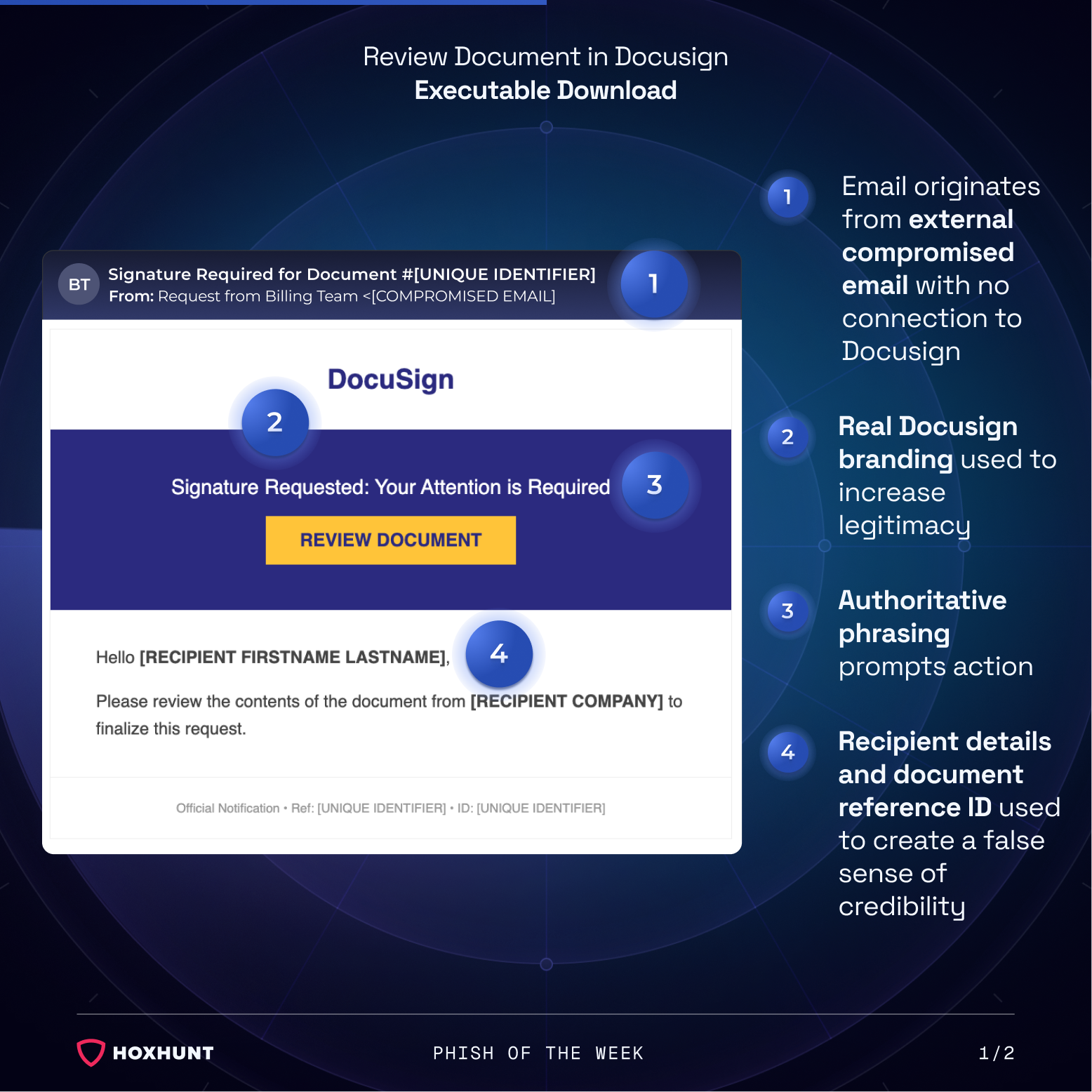
The recipient receives an email styled to look like an official Docusign notification. The sender is labeled "Request from Billing Team," but the message actually originates from a compromised external email account. The email includes a yellow "Review Document" button, the standard call to action also found on genuine Docusign notifications.
Clicking the button leads to a landing page hosted on a domain unrelated to Docusign. Instead of showing the actual document, the page instructs the recipient to download an attachment to view it. The only interactive option on the page is the "Download" button.
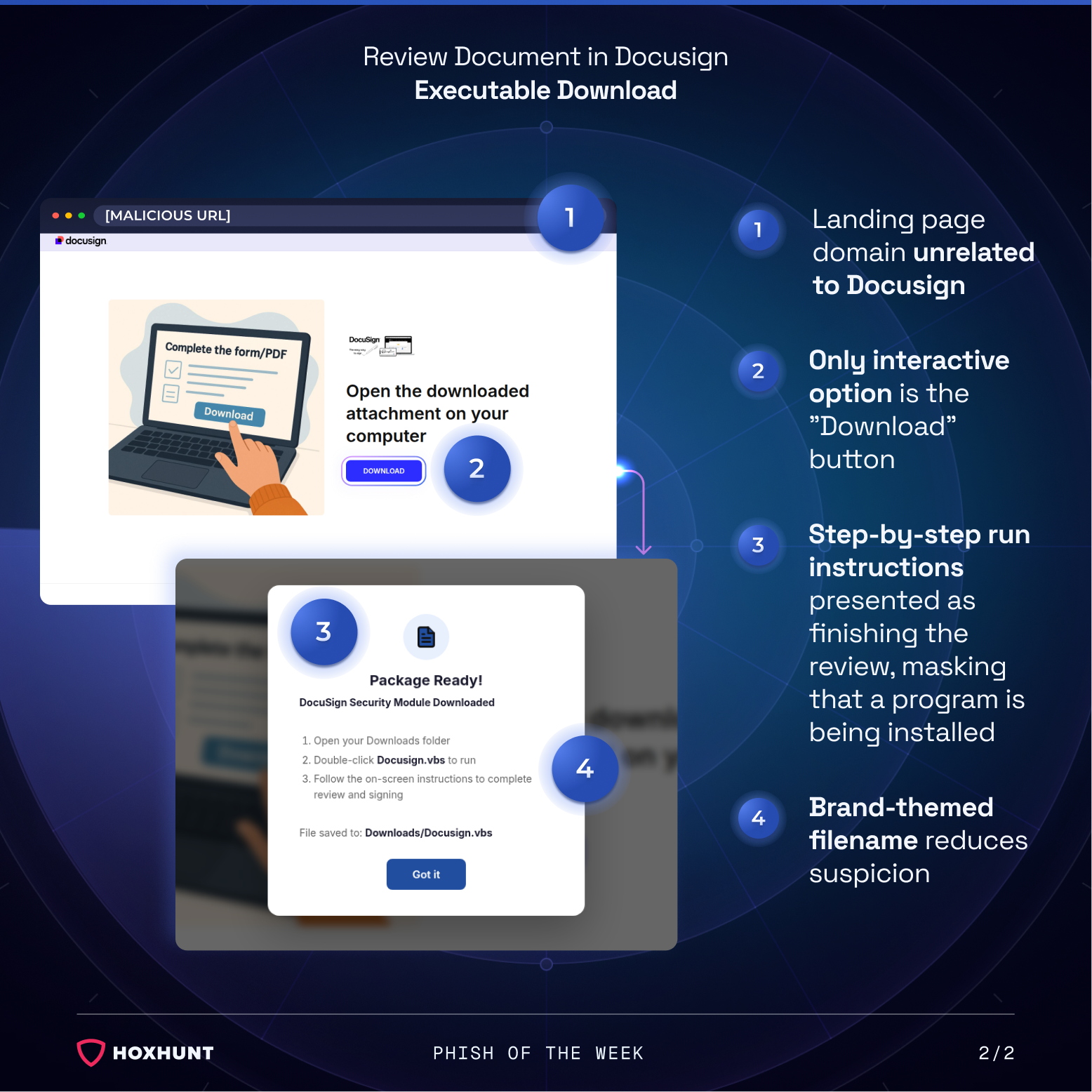
Clicking download triggers a fake pop-up window claiming that a "DocuSign Security Module" has finished downloading. The pop-up gives instructions: open the Downloads folder, double-click the file, and follow the on-screen prompts to "complete review and signing." The instructions frame running the file as the final step of reviewing the document, not as installing software.
The downloaded file is a .vbs script. Running it gives the attacker code execution on the recipient's device.
Why the attack works:
The email looks like a real Docusign notification, with the right branding and layout. At a quick glance, the sender name, "Request from Billing Team," reads as a routine, work-related request, so most people may not stop to notice it actually comes from a compromised address rather than Docusign itself.
On the landing page, downloading the file is the only thing there is to do. With no other option available, many recipients are likely to click it. The pop-up that follows gives calm, neutral instructions for what to do next, so running the file feels like a normal last step rather than something to question. Nothing in the flow raises immediate red flags.
How to spot similar attacks:
- A document or signature request that asks you to download and run a file rather than view it directly in the browser
- Instructions telling you to open your Downloads folder and manually double-click a file to continue
- A file extension such as .vbs, .exe, or .js attached to something presented as a document
- A sender name (e.g. "Billing Team") that does not match the organization or person you would expect to receive a document from
- A landing page address that does not match any official Docusign domain
If a document ever asks you to download and run a program to view or sign it, stop and navigate to the document sharing service website independently to check the request instead of following the link.
What is Phish of the Week?
Phish of the Week is a weekly content initiative by Hoxhunt's Threat Operations team. Each week, we highlight a current phishing trend or notable real-world attack, covering what the threat is, how it works, and what to watch for to spot similar attacks in the future. The goal is to build consistent recognition of evolving phishing themes and tactics over time.
Comments (0)
Popular

Dive in