

Phish of the Week
September 14, 2026
Phish of the Week 14th of September

# Phish of the Week
# Phishing
Annual Performance Review 2026

Mette Luntama
Phish of the Week: Fake Microsoft Teams Performance Review Delivers QR Code Phishing
This QR code phishing campaign poses as a Microsoft Teams notification about a new message, attaching a fake "2026 Annual Performance Review" as a PowerPoint file. Instead of a clickable link, the file hides a QR code that leads recipients straight into a Microsoft credential harvester once scanned.
How the attack works:
The email lands in the inbox styled as an internal notification from "Admin" and carries genuine-looking Microsoft Teams branding. The message actually originates from a compromised external account with no connection to Microsoft or the recipient's own organization. The message tells the recipient they have a new Teams message and asks them to log in to read it.
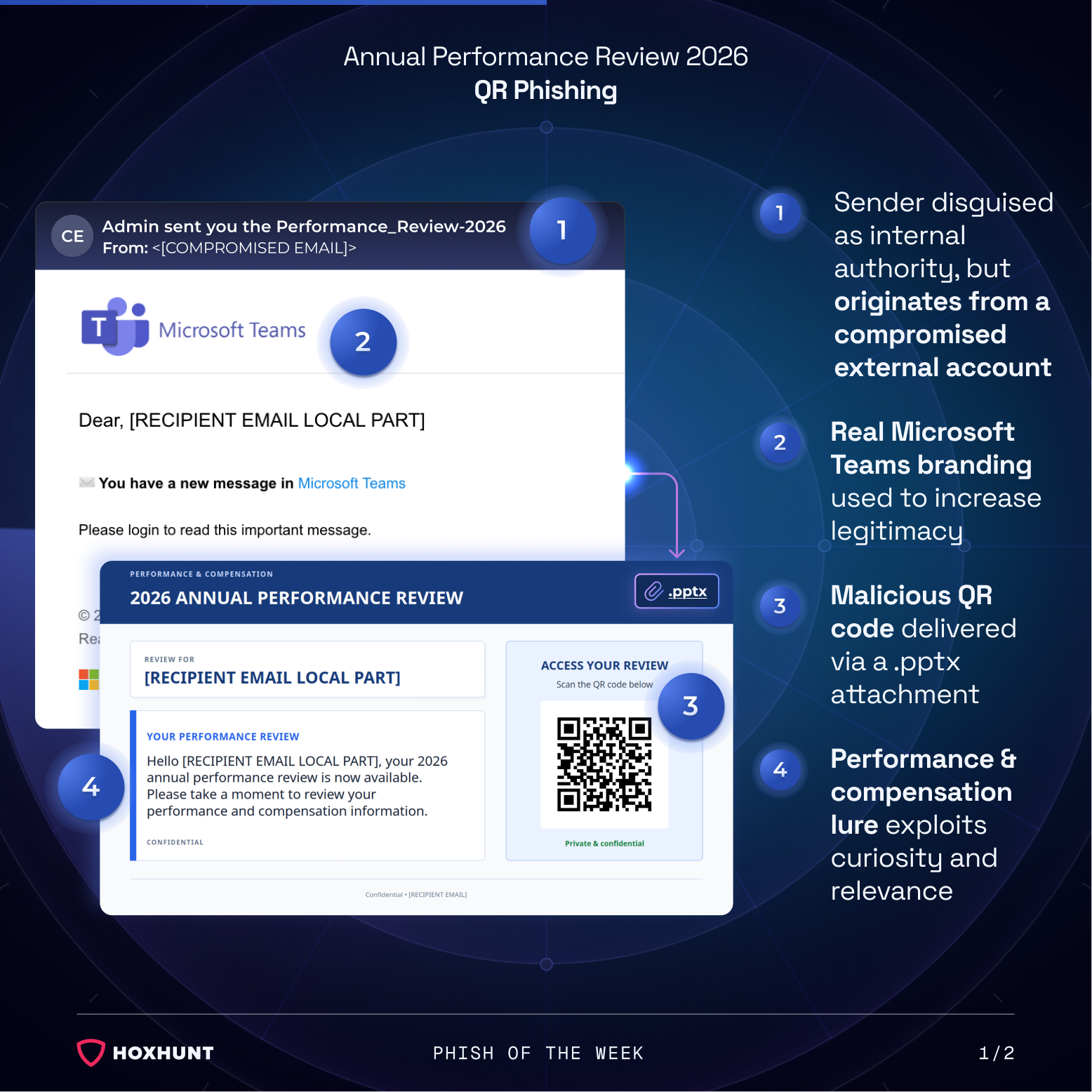
Rather than a link inside the email body, the message carries a .pptx attachment labeled "2026 Annual Performance Review," addressed to the recipient using the local part of their email address for a personalized, targeted feel. The attachment frames its contents as confidential performance and compensation information and, instead of a normal link, displays a QR code under the heading "Access your review." Scanning the code, typically with a personal phone, routes the recipient to a spoofed Microsoft sign-in page hosted on a domain unrelated to Microsoft.
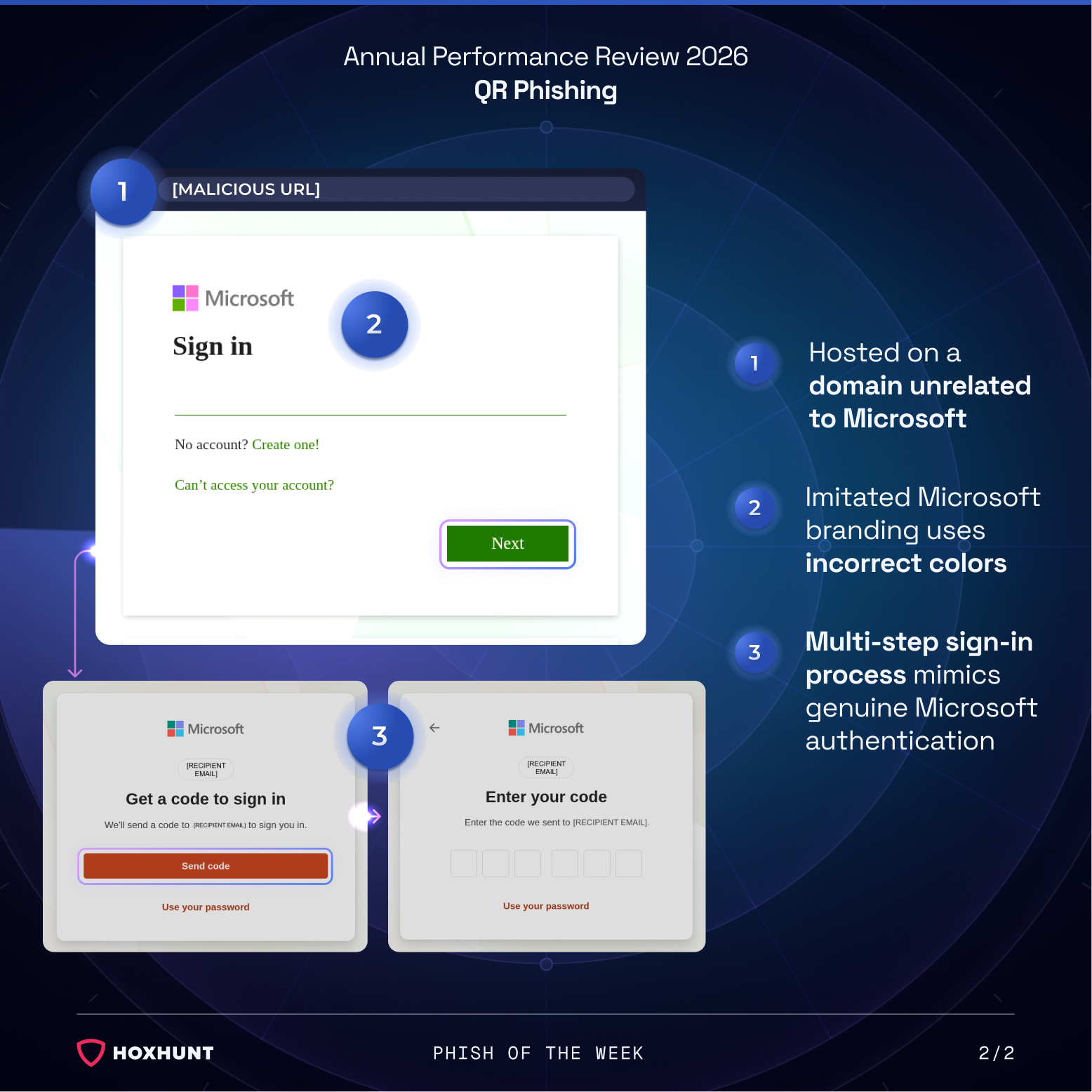
The fake sign-in page reproduces Microsoft's branding, though in slightly incorrect colors, and mimics Microsoft's real authentication flow: an email field, followed by a separate step requesting a one-time code sent to that address. Whatever the recipient enters at each step, including the final code, is captured directly by the attacker's credential harvester.
Why the attack works:
The QR code is the core of this attack's evasion. Placing it inside a PowerPoint attachment rather than a link in the email body keeps it outside the reach of most email security tools built to scan links and attachments for known malicious domains. Scanning the code also shifts the interaction to a possibly personal phone, away from whatever protections a monitored work device would otherwise provide.
The lure itself does the rest. A performance and compensation review is inherently personal, and few employees want to leave one unread, which pushes recipients past the hesitation they might apply to a more generic notification.
The multi-step sign-in, an email address followed by a one-time code, closely tracks how Microsoft's real authentication actually behaves. Recipients used to entering a code as a normal part of signing in have little reason to suspect anything is wrong, even though the incorrect brand colors and the unrelated domain would reveal the page as fake to anyone who paused to check either one.
How to spot similar attacks:
- The message claims to be from "Admin" but the sender address does not match the organization's domain
- An unexpected performance or compensation notification arrives as a PowerPoint attachment instead of a normal email
- The attachment asks the recipient to scan a QR code rather than providing a clickable link
- The email requests a sign-in just to read what should be a routine Teams notification
- The resulting sign-in page displays Microsoft branding in slightly incorrect colors
Rather than scanning a QR code from an unexpected attachment, recipients should open Microsoft Teams directly through the official app or web portal to check for any new messages.
What is Phish of the Week?
Phish of the Week is a weekly content initiative by Hoxhunt's Threat Operations team. Each week, we highlight a current phishing trend or notable real-world attack, covering what the threat is, how it works, and what to watch for to spot similar attacks in the future. The goal is to build consistent recognition of evolving phishing themes and tactics over time.
Comments (0)
Popular

Dive in