

Phish of the Week
June 29, 2026
Phish of the Week 29th of June

# Phish of the Week
# Phishing
Fake Email Inbox Notification

Mette Luntama
Phish of the Week: Fake Email Inbox Notification with Prefilled Microsoft Credential Harvester
Email delivery failure notifications are familiar enough to feel routine, which is exactly what makes them effective as a lure. This Phish of the Week impersonates a system alert warning the recipient that six incoming messages have failed to arrive. A Google domain open redirect disguises the malicious link, and clicking it lands the recipient on a prefilled Microsoft credential harvester.
How the attack works:
The recipient receives an email with the subject line "ATTN: (6) Mailbox delivery failure" followed by a date and a unique identifier string. The sender field displays the recipient's own email address. The email carries the Microsoft logo and opens with a blue banner reading "Heads-up — 6 messages failed to arrive," followed by a brief body text attributing the failure to a synchronization error during transmission.
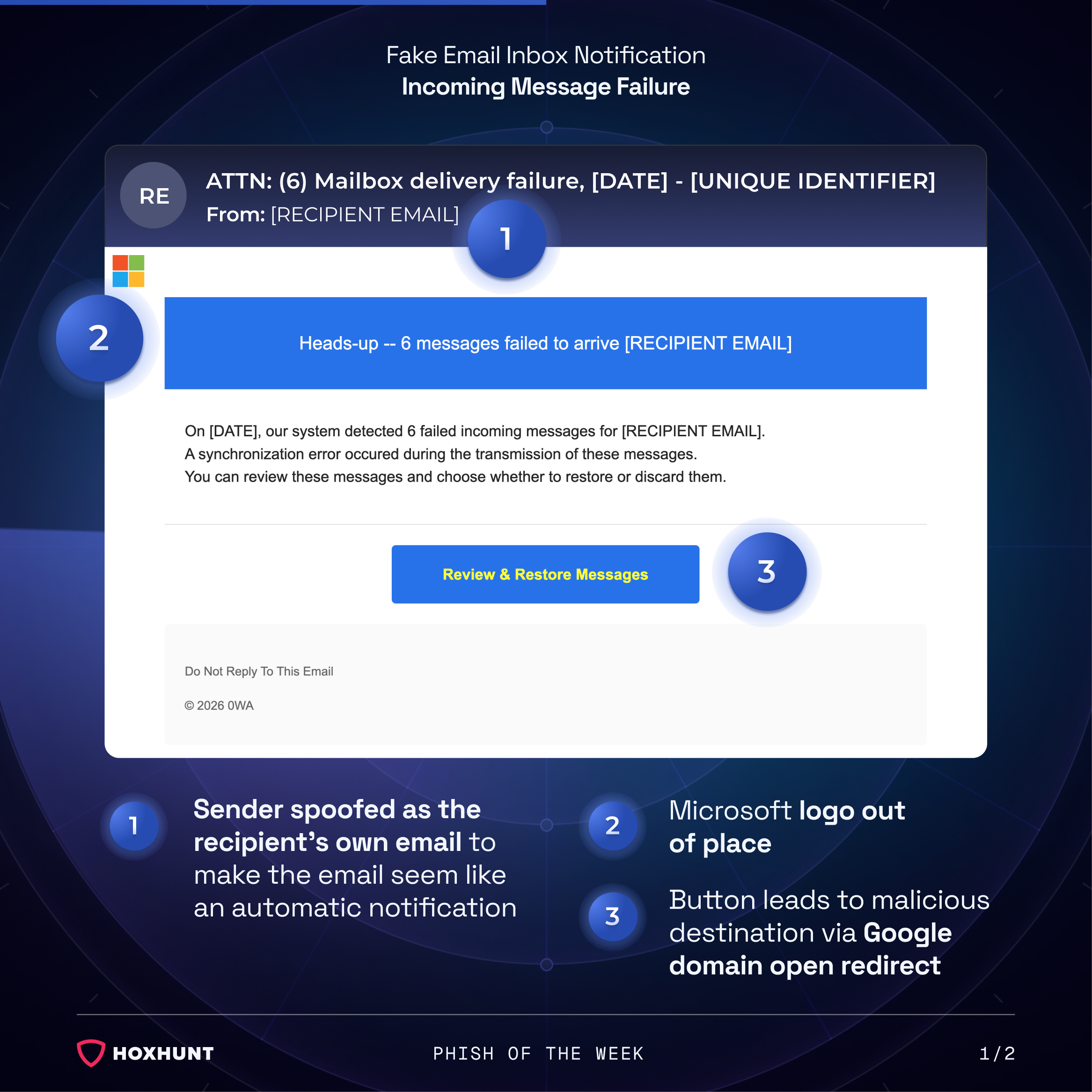
The email contains a single call-to-action button labeled "Review & Restore Messages." Rather than linking directly to a malicious domain, the button routes through a legitimate Google domain open redirect. This means the underlying URL appears to originate from Google infrastructure, passing basic link inspection by both automated filters and recipients who check URLs before clicking.
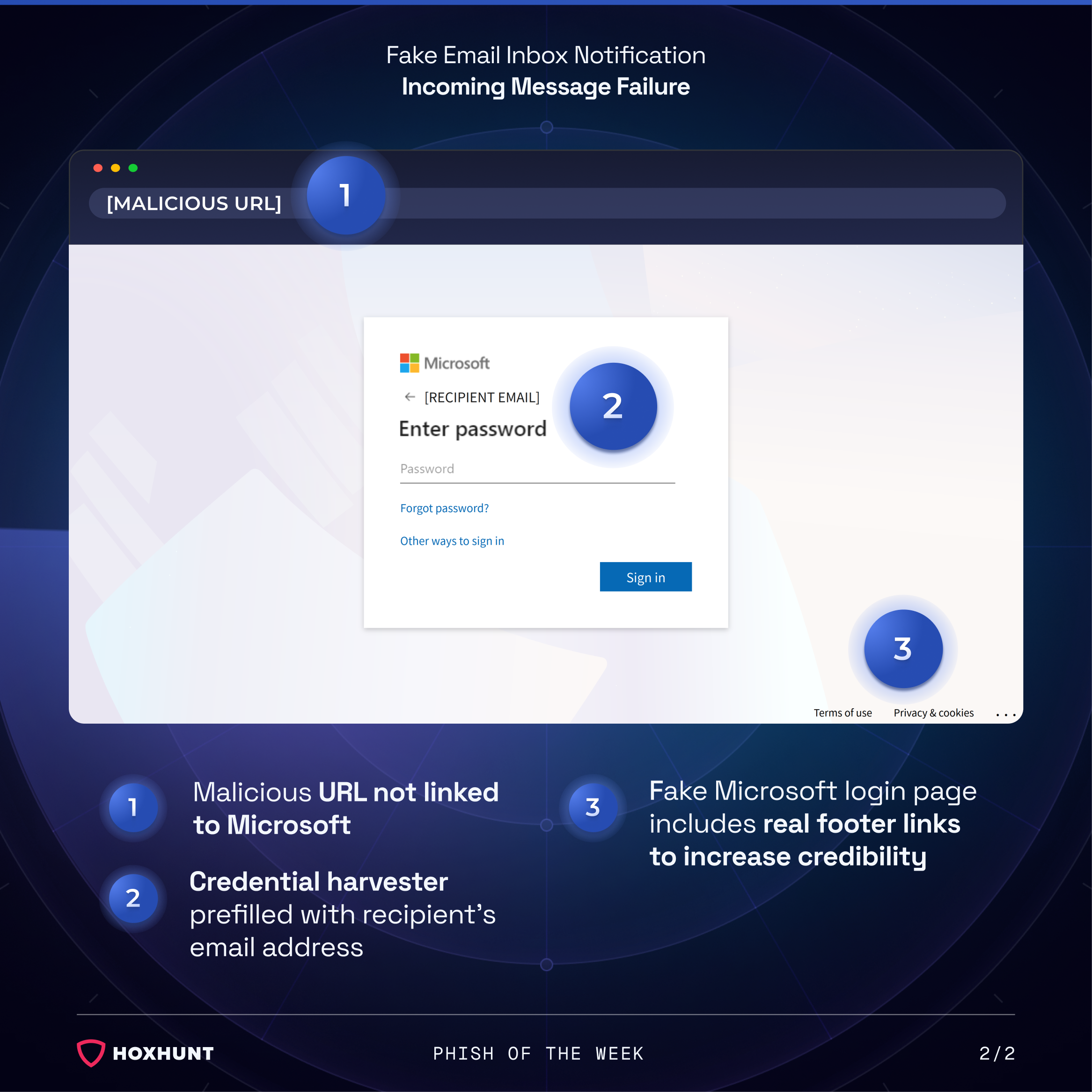
Following the redirect, the recipient lands on a fake Microsoft login page. The page is prefilled with the recipient's email address and prompts only for a password, mirroring the standard Microsoft sign-in flow. The page includes real Microsoft footer links ("Terms of use," "Privacy & cookies") to reinforce the appearance of legitimacy.
Any password entered on this page is captured by the attacker.
Why the attack works:
Spoofed sender
The sender address is set to the recipient's own email, framing the message as infrastructure output rather than external communication. Legitimate automated delivery notifications typically come from a service or system address belonging to your email provider or mail server. In this case the attacker spoofs the recipient's own address instead, which is unusual, but still more disarming than an unknown external sender.
Open redirect
Security filters that evaluate link reputation based on the domain of the redirect URL will see a Google-owned domain and typically allow it through. Recipients who hover over the "Review & Restore Messages" link before clicking observe the same thing. The malicious destination is hidden behind the redirect chain and only becomes visible after the click has already occurred.
Prefilled harvester
The credential harvester page removes remaining friction by prefilling the recipient's email address. This detail is subtle but effective: it signals that the system already knows who the recipient is, reinforcing the idea that the login page is a legitimate continuation of the inbox recovery process. The inclusion of real Microsoft footer links (Terms of use, Privacy & cookies) adds a final layer of visual credibility.
How to spot similar attacks:
- Receiving an email that appears to come from your own address is a common attacker tactic. Treat it with caution and verify with IT if unsure.
- The email design and branding don't match what your organization's mail system actually looks like. If your company doesn't use Microsoft as its email provider, a Microsoft-branded delivery notification makes no sense.
- Hovering over the "Review & Restore Messages" button reveals it routes through a Google redirect URL rather than a Microsoft or organizational mail server address.
- The URL in the browser address bar does not match the branding on the page. A Microsoft-branded login page sitting on a non-Microsoft domain is a clear sign something is wrong.
If you receive an unexpected notification about messages failing to arrive in your inbox, contact your IT or email admin directly to verify. Do not use buttons or links in the notification itself.
What is Phish of the Week?
Phish of the Week is a weekly content initiative by Hoxhunt's Threat Operations team. Each week, we highlight a current phishing trend or notable real-world attack, covering what the threat is, how it works, and what to watch for to spot similar attacks in the future. The goal is to build consistent recognition of evolving phishing themes and tactics over time.
Comments (0)
Popular

Dive in