

Phish of the Week
June 8, 2026
Phish of the Week 8th of June

# phishing
# Phish of the Week
Claude Ads Impersonation

Mette Luntama
Phish of the Week: Claude Ads Impersonation with Browser-in-the-Browser Credential Harvester
This week's Phish of the Week features a Claude impersonation attack. Claude is one of the most talked-about AI services right now, making it a natural target for attackers. An email about a service the recipient already knows and may use feels both relevant and plausible. Unlike many phishing attempts, this attack carries no urgency or threat — it reads as a routine marketing notification, making it less likely to raise suspicion.
How the attack works:
The recipient receives an email from a look-alike sender address using Claude branding, claiming their account is now eligible for "Claude Ads." The sender name and address are designed to appear legitimate at a glance.
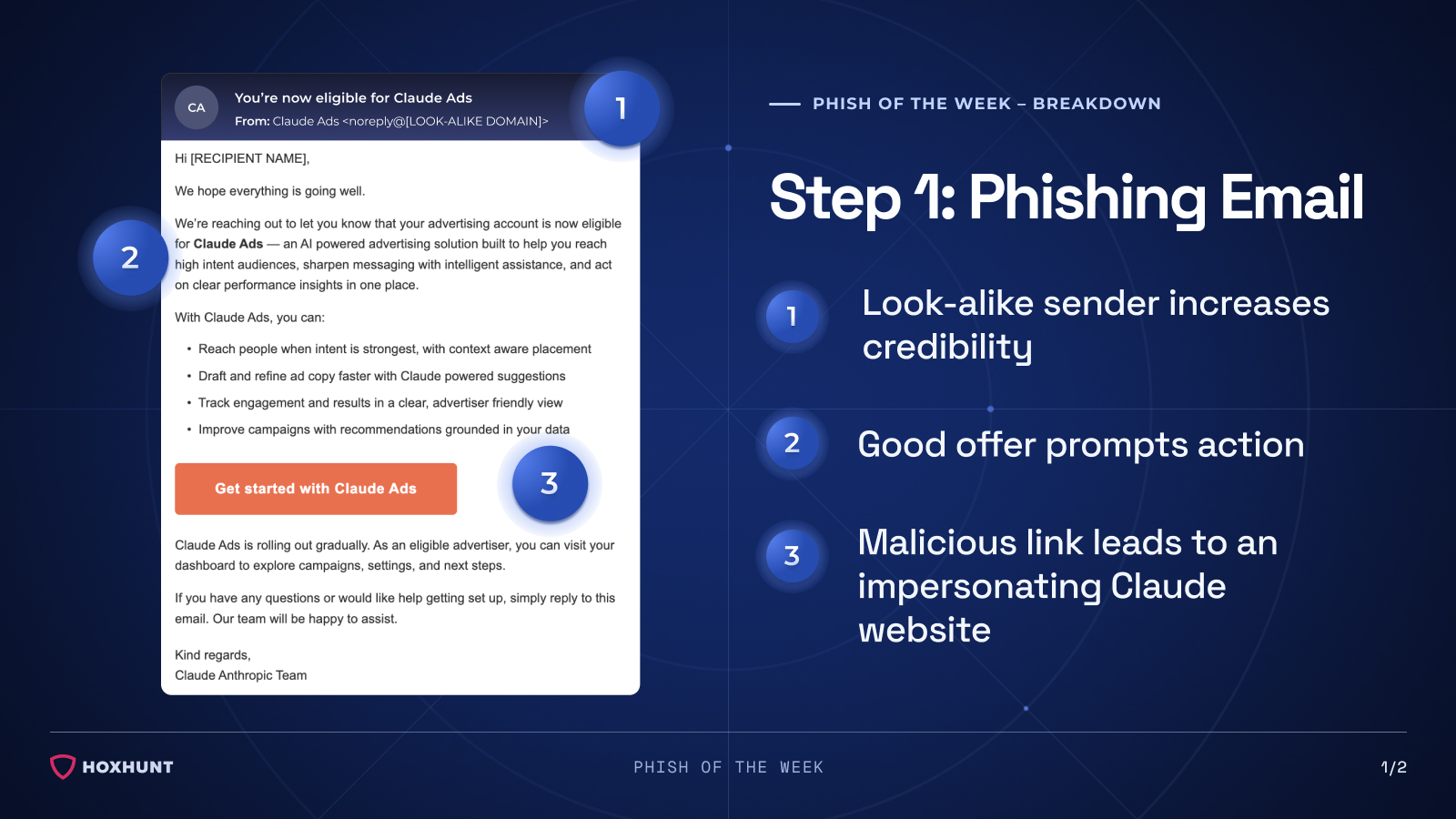
The email reads as a polished product notification — no urgent deadlines, no pressure to act immediately. With Claude actively expanding its feature set, an invitation to a new advertising product feels entirely believable.
The email contains a link that leads to an impersonating Claude website.
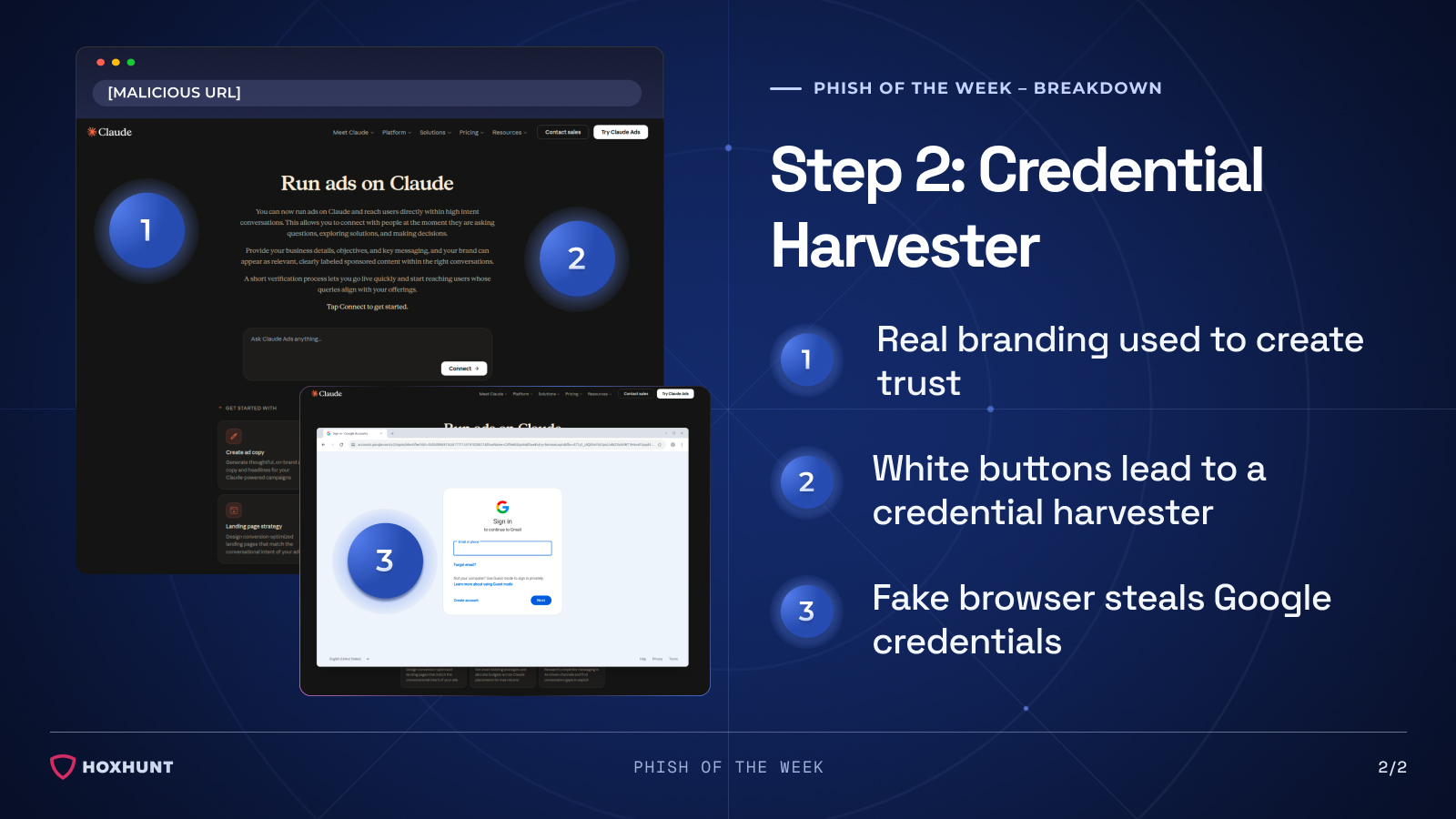
After clicking the link, the recipient lands on a page that looks identical to the real Claude website. To lower suspicion further, the navigation bar links redirect to the actual Claude site — making the page feel entirely trustworthy.
However, clicking either of the white call-to-action buttons triggers a Browser-in-the-Browser pop-up, a fake browser window that appears as a movable overlay within the page, simulating a legitimate Google sign-in prompt.
Any credentials entered are sent directly to the attacker.
Why the attack works:
This attack is effective because no single element stands out as obviously suspicious. The email uses real Claude branding, a convincing sender name and address, and a polished structure that mirrors legitimate product communications — there are no urgent deadlines, no alarming language, nothing that triggers the usual instinct to pause. The landing page reinforces this trust, looking identical to the real Claude website with functional navigation links pointing to the actual site.
The final layer — the Browser-in-the-Browser pop-up — is particularly difficult to detect without prior awareness of the technique. Unlike a redirect to a separate phishing page, the fake browser window appears as a movable overlay within the page itself, closely mimicking a real Google sign-in prompt and giving no obvious visual indication that anything is wrong.
How to spot similar attacks:
- The sender domain does not match the official platform
- The advertised product, service or feature cannot be verified through an independent search
- The sign-in pop-up appears as an overlay within the page rather than opening in a separate browser window
- The pop-up window can be moved around but cannot be dragged outside the browser boundaries
- The sign-in requirement doesn't match the nature of the action — exploratory or promotional flows rarely need full account access
If you receive an unexpected email about a new product, feature, or promotion from a service you use, navigate to the official service independently to verify — do not follow links in the email.
What is Phish of the Week?
Phish of the Week is a weekly content initiative by Hoxhunt's Threat Operations team. Each week, we highlight a current phishing trend or notable real-world attack, covering what the threat is, how it works, and what to watch for to spot similar attacks in the future. The goal is to build consistent recognition of evolving phishing themes and tactics over time.
Comments (0)
Popular

Table Of Contents
Popular
Dive in