

Threat studies
August 17, 2026 · Last updated on August 31, 2026
Callback Phishing
# Phishing
# Threat Studies
Third-party service misuse

Laura Lehtiö
What is callback phishing?
Callback phishing is a social engineering technique where attackers trick recipients into contacting them directly by phone. The lure is designed to create enough urgency that calling a provided number feels like the obvious next step.
Common scenarios include an email claiming the recipient has been charged for a purchase they never made, or that their password was changed by someone else. To recipients, calling the number provided in such an email can feel like the fastest way to sort things out. But the number belongs to the attacker, who answers as support staff and works towards payment details, credentials, or remote access to the recipient's device.
How third-party services are misused for callback phishing
Attackers often misuse legitimate notification emails from widely recognized brands such as Amazon, Visa, and Costco to deliver callback phishing lures. They do this by inserting a phone number they control into a free-text field that gets pulled automatically into a notification email. Because the email originates from a trusted platform’s infrastructure, it bypasses spam filters and lands directly in the recipient’s inbox. In the end, phishing is a numbers game, and landing in more inboxes means more people may interact with the attack before the social engineering even begins.
The following examples show how this technique works in practice.
Campaign 1: Amazon - Password change by someone else
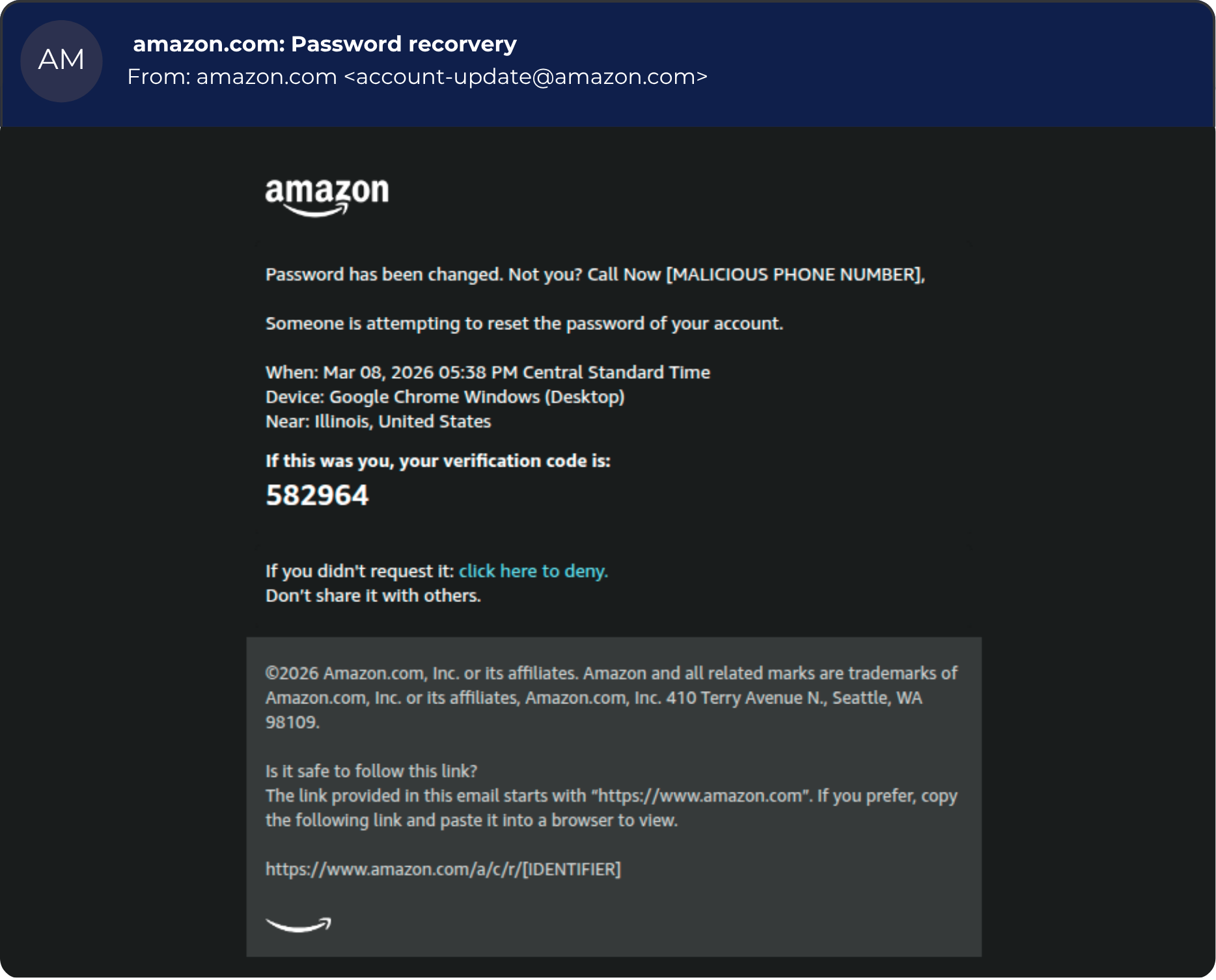
The first example campaign misuses a genuine Amazon password recovery email (Figure 1). It originates from a legitimate
amazon[.]com address and carries Amazon’s real branding.In this email, the attacker injects malicious content into the user-controlled account name field. Since Amazon inserts the account name into the email’s greeting line, the malicious content appears right after Amazon’s branding at the top of the email. The injected text claims that the recipient's password was changed and asks them to call a phone number if they didn’t make the change themselves.
At first glance, and in every technical respect, this email looks like a standard Amazon security alert. The only alteration is the account name field, which the attacker has set to contain a malicious phone number and call-to-action.
Campaign 2: Visa - Cancel a charge you never made
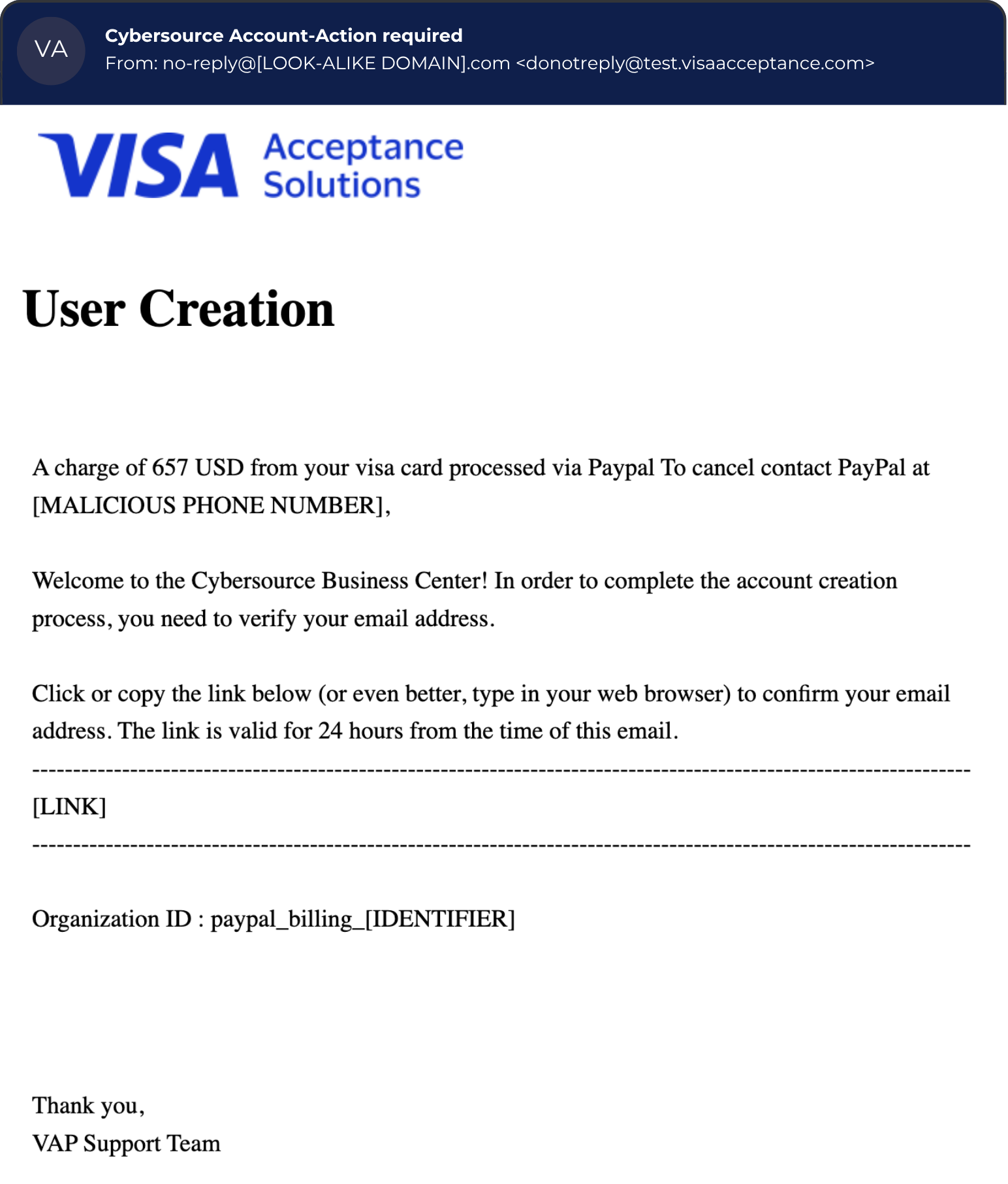
The second example campaign misuses an email from CyberSource, Visa’s business payment management platform, to deliver a malicious phone number (Figure 2).
The attacker plants the lure in the name field of Visa's user-creation form: text about a fake PayPal charge and an attacker-controlled phone number for cancelling it. Instead of creating the account with the recipient’s email address, the attacker creates it with their own and then uses a DKIM replay technique to deliver the notification to the target’s inbox. That forwarded email is a genuine user-verification email carrying the attacker's injected content. The recipient receives a benign-looking email describing a charge they never made, and a number to call to cancel it. For most people, an unexpected charge is alarming enough to act on immediately, which is exactly what the attacker is counting on.
Campaign 3: Costco - Order cancellation
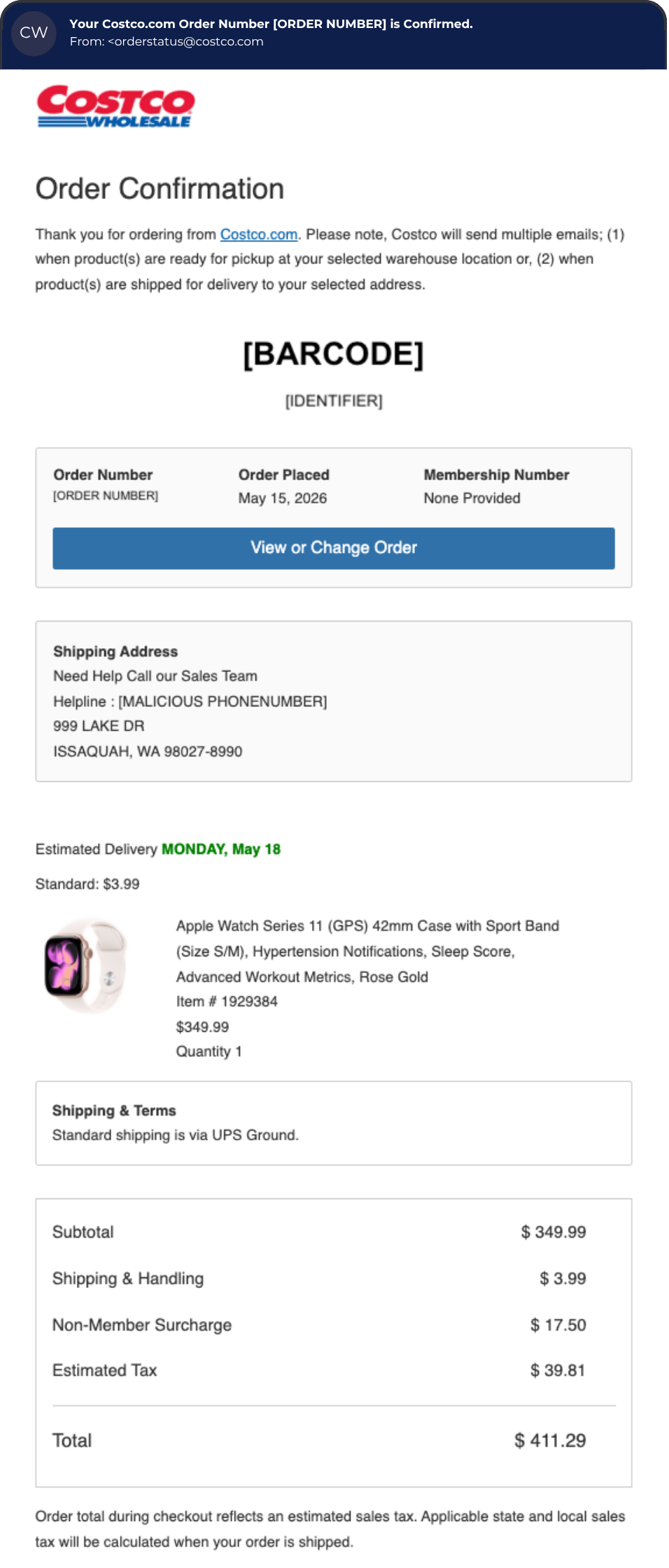
The third example campaign is an order confirmation email from Costco (Figure 3), a large American retail chain. Here, the malicious phone number, presented as a customer helpline, is injected into the shipping address field. In this case, the lure is an order the recipient never placed, and they are prompted to call the number to cancel it. What makes this example different from the previous two is where the number is hidden. A phone number sitting in a shipping address field looks like it belongs there in a way that the same content in place of a short name (as in the Amazon example) does not.
Why these attacks are effective
Misusing legitimate services lets attackers turn real emails into phishing lures. Because the malicious content is injected into an otherwise genuine email, the message itself doesn’t look suspicious.
Misusing legitimate infrastructure also increases the chances of the email reaching the inbox, since there are no links or attachments for security tools to scan. That leaves the phone number as the only thing the attacker wants the recipient to act on. Calling it shifts the attack to the phone, where IT has far fewer defenses than in email.
When it comes to humans, these attacks are psychologically well-built. The attack is designed to create enough urgency that calling the provided number feels like a reasonable next step. It also helps that the email template comes from a widely known service like Amazon, so it does not raise many concerns and looks completely legitimate. On top of that, a phone number in a legitimate-looking email tends to feel safer than a link or attachment, which makes the recipient less likely to pause and question the number.
How to harden your services
All three example campaigns share a common root: the attacker types a phone number into a field they control and the resulting email originates from a legitimate platform, whether sent directly or forwarded on. Because the resulting email is real, authentication passes, filters have little to work with, and even volume detection misses it.
You can’t stop attackers from trying, but you you can control what your platform allows into the email. A few recommended controls to prevent your service from being misused this way:
- Avoid raw user content in security emails. Use server generated information like request time and device information instead. Add fixed lines to every security email template, such as “If this is not your account, you can ignore this email” and “We will never ask you to call a phone number,” so recipients have something to check against when something feels off.
- Restrict free-text input fields. If your system takes content directly from user input fields, limit both character count and allowed characters. A name field has no need for numbers or full sentences. Flag entries that contain phone number patterns or urgent-sounding phrases before the email is sent. Include a warning about odd entries like “this doesn’t look like a street address” directly in the form to let customers correct themselves.
- Visually separate user-entered content from your template text. Keep user content out of subject lines and place it in a clearly labeled area away from your branding and instructions so recipients can easily tell the difference. Skip personalized greetings, and apply strict limits on length, digits, or lure words.
- Use phone number patterns as your primary detection signal. They work across languages so match numbers loosely to catch lookalike characters and unusual separators like the letter O instead of zero or dots between digits. Also use lure words from your markets to sharpen the misuse signal.
- Shorten or mask user entry data in outbound notifications. Displaying a street address as ending
…1Aor an email asa****@hoxhunt[.]commakes it harder to include a full malicious phone number that recipients can call.
Key takeaways
- Callback phishing doesn't need a malicious link or attachment. All it takes is a phone number and a convincing enough reason to call it.
- Attackers misuse legitimate platforms to deliver lures from real, trusted sending addresses.
- A malicious phone number can appear anywhere in the email, not just the message body.
- Platform owners can reduce misuse by limiting what goes into free-text fields and visually separating user-entered content from template text.
Comments (0)
Popular

Dive in
Related
Content
How phishing emails impersonate social media platforms
By Herman Heliste • Oct 5th, 2026 • Views 13
Content
Can a Password Manager Be Hacked? And How Do We Talk About It?
By Ant Davis • Oct 15th, 2026 • Views 4
Content
How phishing emails impersonate social media platforms
By Herman Heliste • Oct 5th, 2026 • Views 13
Content
Can a Password Manager Be Hacked? And How Do We Talk About It?
By Ant Davis • Oct 15th, 2026 • Views 4